
Announcing FruitMenu Redux 1.0* and Xounds Redux 1.0*!
/First and Foremost℠: You can download FruitMenu Redux 1.0.5 and Xounds Redux 1.0.1 from https://totallynotmalicious.com/software if you want to play with them while you read this. Read the last paragraph if you’re a journalist or post about new software products and want a free discount code. Each application has a 14-day free trial.
FruitMenu Redux 1.0 and Xounds Redux 1.0 are the first entries in what you might call a “Haxies Redux” line—not a real name, but one used here for nostalgia and exposition. These utilities re-create beloved features that Apple provided in Mac OS 8 through Mac OS 9.2.2, and that we at Unsanity later brought to Mac OS X 10.0 through Mac OS X 10.6.8 with our haxies. They do so within today’s security constraints, including System Integrity Protection, which makes traditional haxies nigh impossible unless you find and exploit a security vulnerability. Although the modern macOS security landscape prevented some features from returning, it also gave us an opportunity to rethink the core architecture and add capabilities that the original FruitMenu and Xounds never had.
For more information, some background, and technical details, please see this post on FruitMenu Redux and this post on Xounds Redux.
Since our conceptual announcement, we formed an LLC (Totally Not Malicious Software), Apple approved the change from an individual account to an organization Developer ID account, and Paddle approved us for payments. It’s finally time to release the software!

FruitMenu Redux 1.0.5
General Overview
A beloved piece of software returns for modern macOS and its security expectations.
Customize your Apple menu!
Supports more than 30 item types!
Restore the six-color Apple logo!
Add any arbitrary file or folder to your customized menu!
Open System Settings panes and Shortcuts directly!
Show windows of running applications, including their tabs!
Set hotkeys on arbitrary items!
Command-click any application, file, folder, recent item, or settings pane to show it in the Finder.
Use it as a Menu Extra instead if you want!
Requires macOS 26.6 or later (including macOS 27).
Requires an Apple Silicon Mac (I don’t have an Intel-based Mac to test with).
$7 introductory price. $10 normally. 15% discount if you buy both Xounds Redux and FruitMenu Redux together. 14-day free trial.
Specific Features
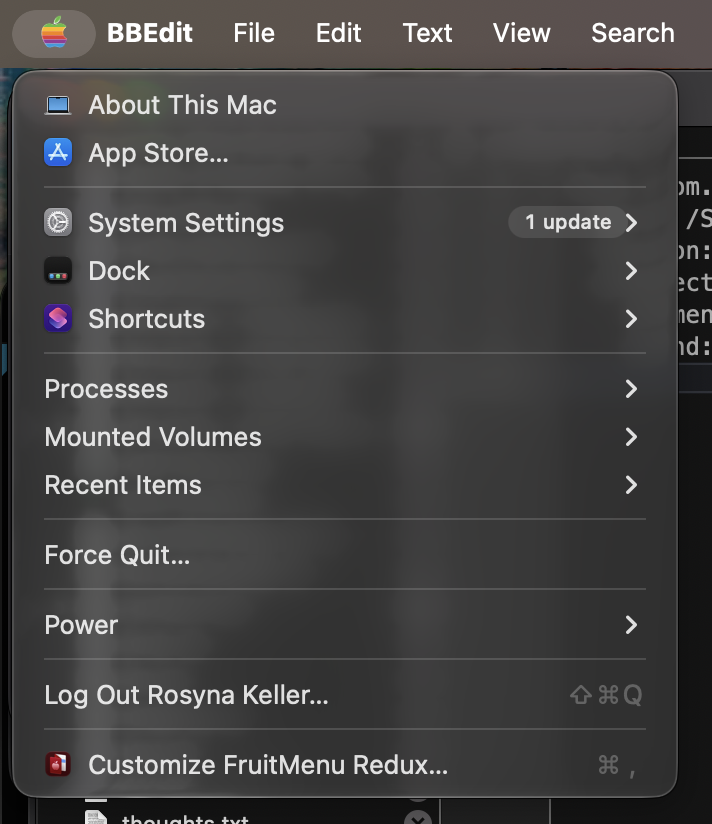
FruitMenu Redux in BBedit, I manually renamed “Running Applications” to “Processes” in the Menu Editor
FruitMenu Redux lets you customize the Apple menu.
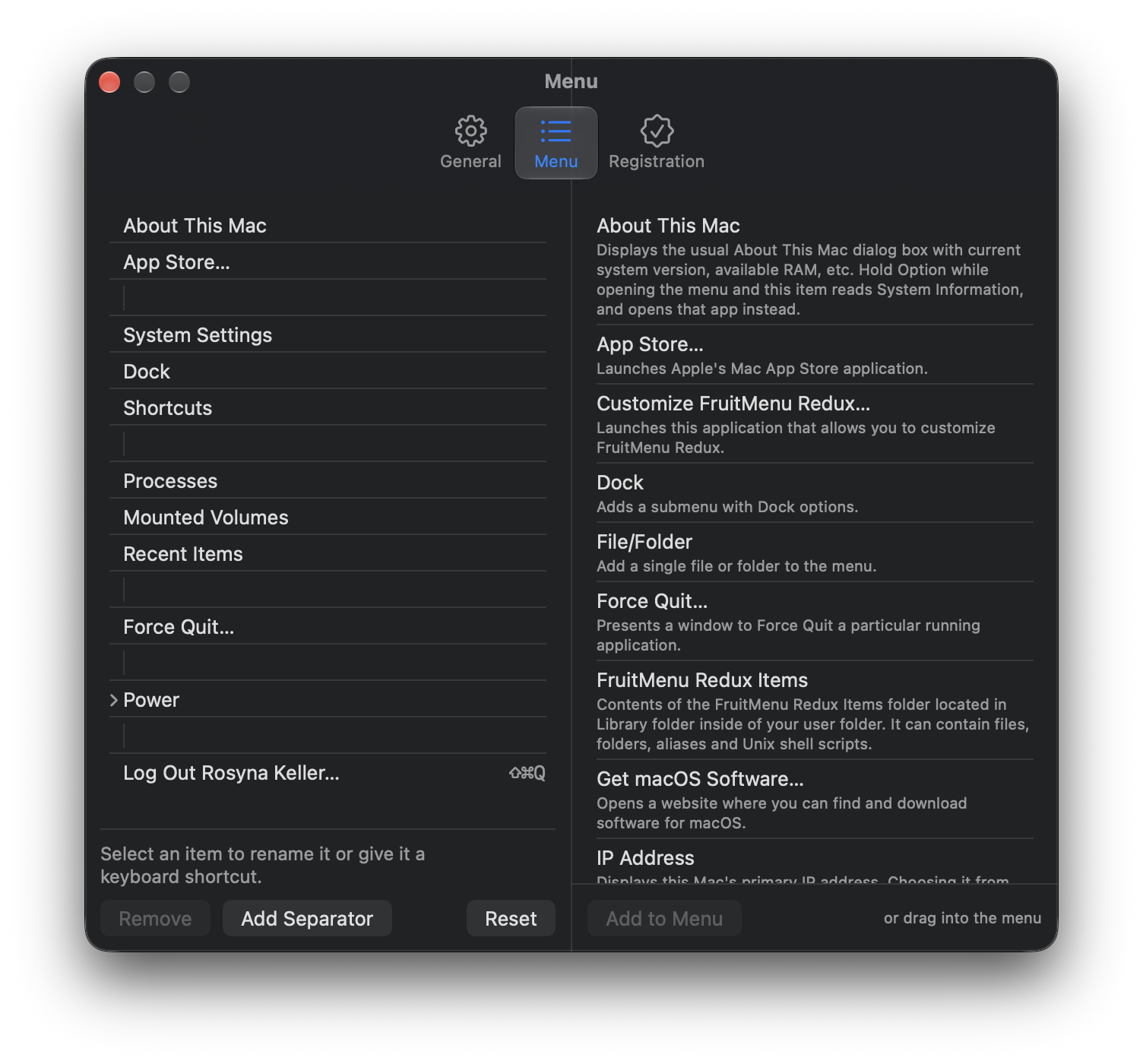
FruitMenu Redux Menu Editor
A built-in visual editor displays your menu on the left and a library of over 30 item types on the right. You drag items from one to the other (almost like Font/DA Mover, the best UX ever created). The library includes files and folders, submenus, Running Applications (and you can enable an option to show open windows and tabs), Mounted Volumes, Recent Items, Force Quit, Sleep, Restart, Shut Down, Shortcuts, Software Update, separators, System Settings panes, and more!
Anything you put in the FruitMenu Redux Items folder in your Library also appears in Files, folders, and aliases. A Finder service lets you add items without searching.
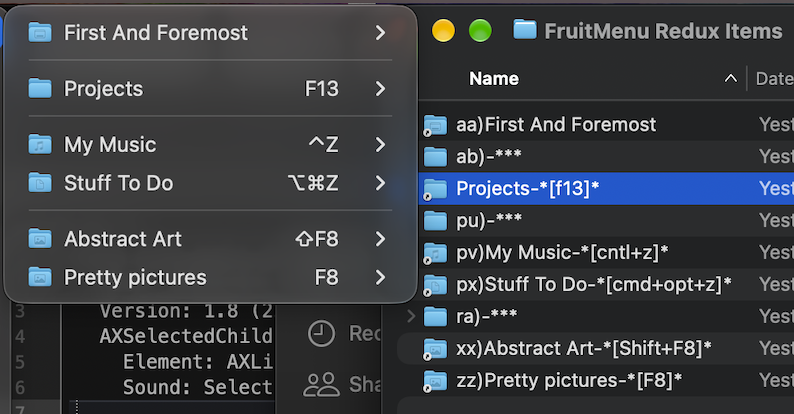
Setting hotkeys using FinderPop-style naming conventions
Every item can have a keyboard shortcut, including the ones in the FruitMenu Redux Items folder (based on the FinderPop hotkey and ordering naming scheme, see above).
It can replace the Apple menu, appear as its own menu bar icon, or do both. It can also paint the Apple logo in the original six colors if you so desire.

Xounds Redux 1.0.1
General Overview
A beloved piece of software returns for the modern macOS and modern security expectations. Make your Mac sing with interface sounds!
Supports Mac OS 8.5-Mac OS 9.2.2 Sound Sets
Supports old Xounds xoundsets.
Supports over 100 interface sounds.
Customize any supported event with an arbitrary sound.
Make your own custom Xoundsets!
Requires macOS 26.5 or later (including macOS 27).
Requires an Apple Silicon Mac (I don’t have an Intel-based Mac to test with).
$7 introductory price. $10 normally. 15% discount if you buy both Xounds Redux and FruitMenu Redux together. 14-day free trial.
Specific Features
Xounds Redux plays sounds for UI interactions. Menus opening and closing; items highlighting; windows opening, closing, moving, collapsing, and zooming; disks mounting and ejecting; buttons and checkboxes and tabs being pressed; apps launching and quitting; users logging in and logging out; key presses (if enabled).
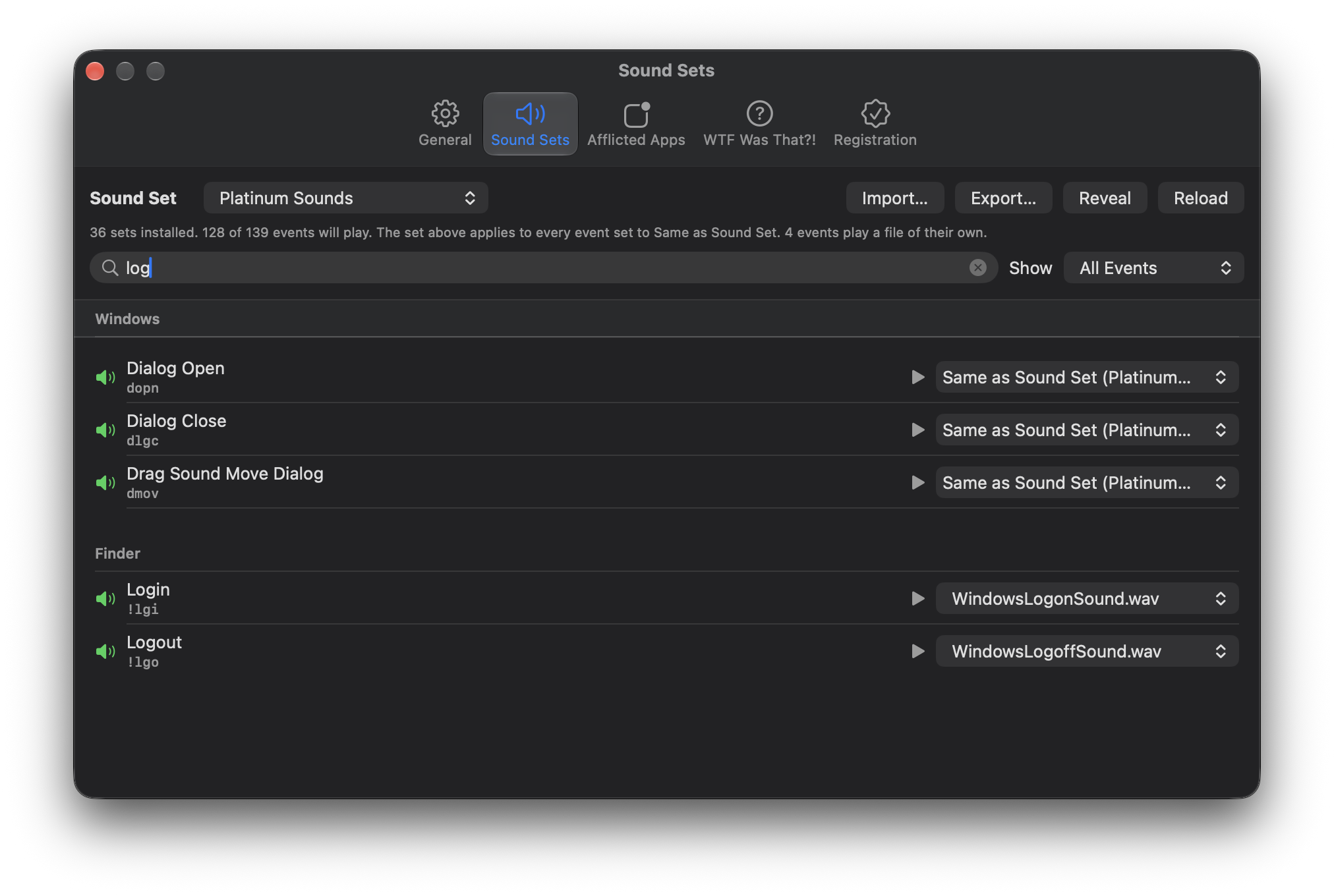
Xounds Redux’s Sound Set Editor, with events filtered to show items with “log” in the text
You can assign any sound file to any of more than a hundred events, in any sound format macOS can natively play.
It reads Xoundsets from the original Xounds. It also reads Appearance Sound Sets (use The Unarchiver) from Mac OS 8.5 through 9.2.2 and converts them into Xoundsets, resource forks and all. Getting that working required writing new code against the Resource Manager, which technically still exists if you ask it nicely enough.
You can build your own Xoundset and export it. I quite obviously lack the skills for sound design, so this is how people with those skills can share their work.
Sounds pan with the pointer, so sound for an action on the left side of the screen comes out of the left speaker. Key presses also pan with the key's location on the keyboard (it's just that cool).
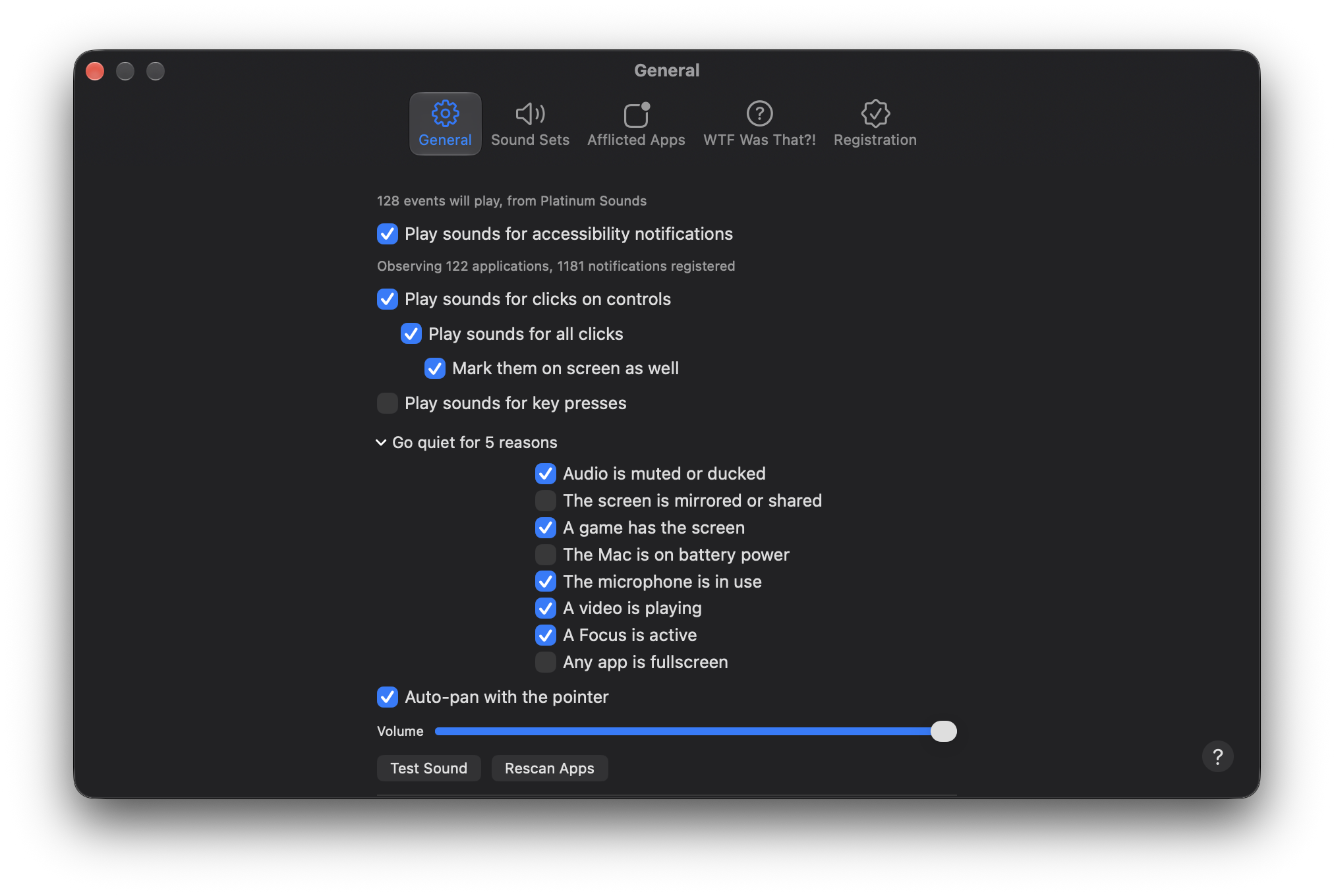
Xounds Redux settings window, with quiet reasons expanded
Xounds Redux goes quiet on its own if you choose one or more of these reasons: the audio is muted or ducked, the screen is mirrored or shared, a game has the screen, the microphone is in use, a video is playing, Focus is on, any app is in fullscreen, or the Mac is on battery power. That last one is useful if you’re oot and aboot and don’t want to disturb people.
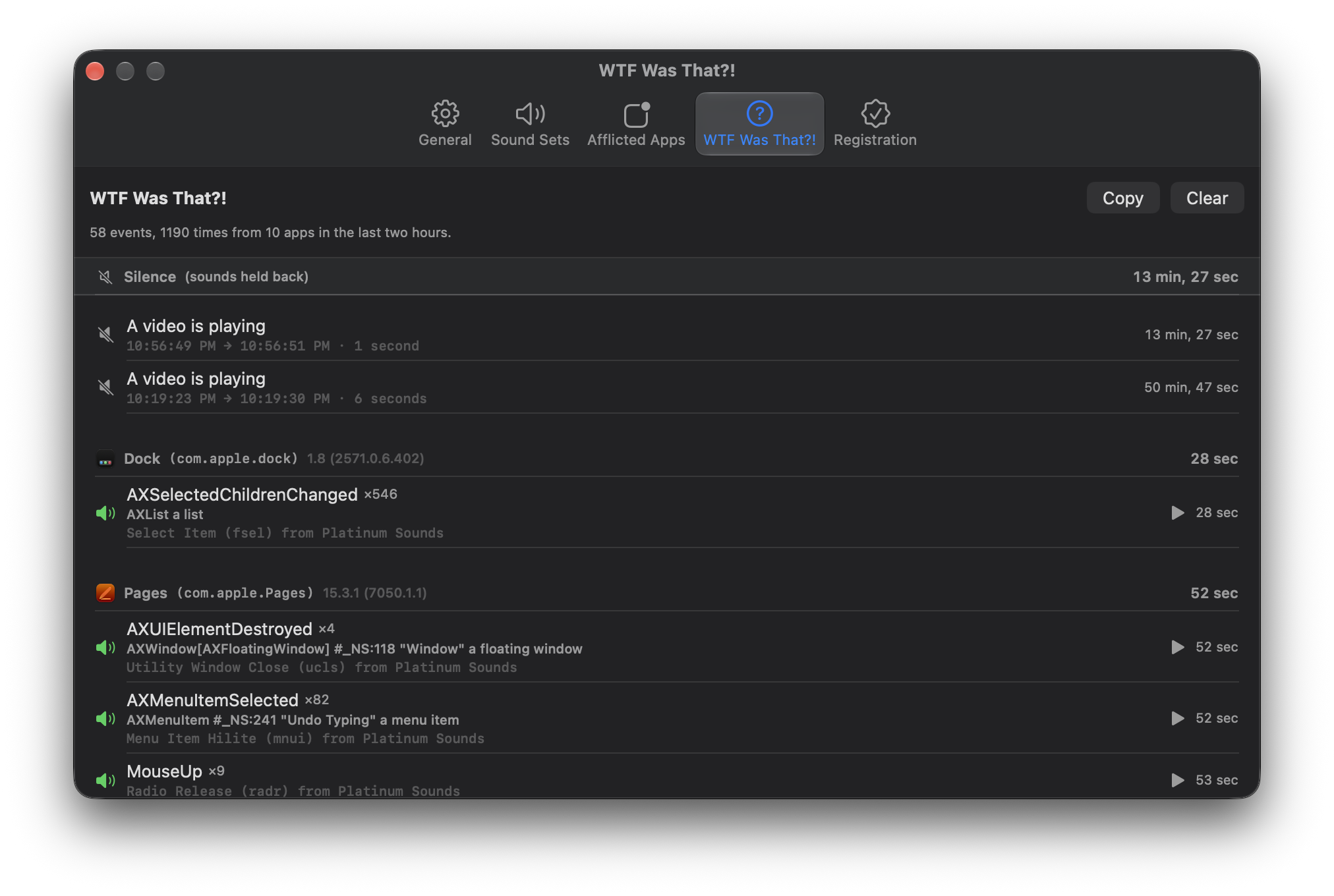
Xounds Redux has a tab called “WTF Was That?!” It lists everything that made a sound, the event, and the accessibility element behind it, and then copies the log to the clipboard as text if you right-click/control-click on a row. It is there because the first question anyone asks is “what was that,” and I would rather see the answer than guess at it. It’s also very useful for debugging the cause of an odd sound here or there.
*Some Last Words
We’ve obviously revved FruitMenu Redux 1.0 and Xounds Redux 1.0 a few times in response to user feedback, with instructions in the Read Me included with each application and on the support page. I also highly recommend browsing all the settings in both to see out what the software can do!
You can also keep up with updates to FruitMenu Redux and Xounds Redux via their respective release RSS feeds.
The FruitMenu Redux and Xounds Redux icons are by Davi Andrade.
The Road to 1500 [Sales]
I’m trying to reach a goal of 1500 sales before 12:01am on October 1st, 2026. To help reach that goal, the prices of FruitMenu Redux and Xounds Redux are reduced to $7 each from $10 each until September 30th, 2026. Buy both at the same time, in the same transaction, and save 15%.
How do indie developers promote products nowadays?
This is a big ask of everyone. Please share this post. It’s been 14 years and I have no idea how to promote independent software anymore. All the major publications I used to email PRs to, Maccentral, MacNN, MacInTouch, MacFixIt, VersionTracker, et cetera are gone now. I have no idea who to contact. I feel so old.
For the Press:
If anyone writes about software and wants a free 100% discount on FruitMenu Redux and Xounds Redux (to write about them), please contact support from a company email address or contact me on social media from an associated social media profile. I accept DMs on most platforms. I don’t like most platforms, but I accept DMs there!