
Coming Soonish: FruitMenu Redux
/First, this project needs funding. Go here if you wish to help, even a little bit. Thanks so much; all help is greatly appreciated!
What’s the holdup on betas?
Apple. Apple’s the holdup. I can’t even notarize software.
On Tuesday, August 11th, 2026, I was finally able to file for a Limited Liability Company (LLC). On Wednesday, August 12th, 2026, my LLC was approved without paying for expedited service. I then converted my Individual Apple Developer account to an Organization account. I want the software I release to use the name I’ve been using for over a year when filing privacy bugs with Apple. I’ve worked hard to make “Totally Not Malicious Software” known, and I want to use it as my software company name. Between Saturday, August 15th, and Sunday, August 16th, Apple responded and requested my LLC form and government ID, both of which I quickly provided. I haven’t heard anything from Apple since Sunday (August 16th), when they said they were escalating it to their “Senior Adviser Team.” Whatever that is.
Sadly, while a developer account is in transition, you can’t use some “membership benefits”. This includes the inability to notarize software. Because Xcode can’t find the name associated with my developer ID account, it displays “No Account for Team <Team ID>” and won’t even attempt notarization. I’m therefore unable to distribute software, even using my old Team ID, until Apple transitions my account.
Let’s talk about FruitMenu Redux
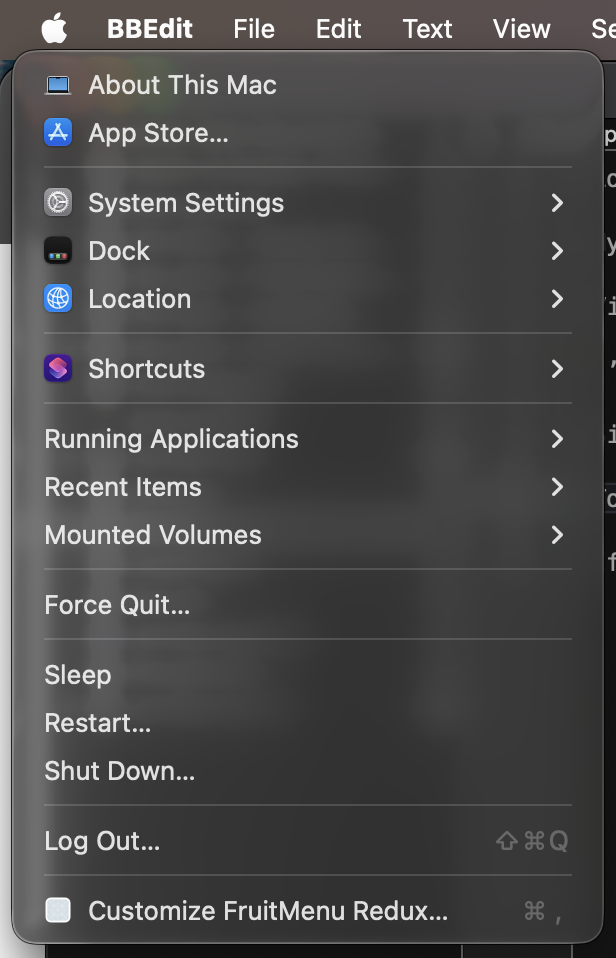
That’s not the standard Apple Menu!
Like Xounds Redux, FruitMenu Redux revives a utility (FruitMenu) that brings lost Mac OS Classic features to Mac OS X. Specifically, it restores the fully customizable Apple menu.
Current Feature Set (as of August 23rd, 2026)
The first step was to implement every FruitMenu feature that’s still possible in the current macOS security environment. That immediately ruled out features requiring patching menus (sigh, I really miss patching menus) and features that require privileges now gated behind restricted entitlements. I also added support for viewing and executing Shortcuts. In all, you can add the following items to FruitMenu Redux menus:
About This Mac (also shows System Information when you press and hold the Option key)
App Store…
Customize FruitMenu Redux…
Dock (shows Dock settings)
File/Folder
Force Quit…
FruitMenu Redux Items (from a custom folder)
Get macOS Software…
IP Address (internal/LAN only, not external)
Location (Network)
Log Out (…)*
Menu Separator
Mounted Volumes
Recent Applications**
Recent Documents**
Recent Folders**
Recent Items**
Recent Servers
Restart (…)*
Reveal FruitMenu Redux Items
Running Applications
Shortcuts***
Shut Down (…)*
Sleep
Software Update…
Submenu
System Settings Panes (a hierarchical listing of System Settings panes)
*Log Out, Restart, and Shut Down are available with user confirmation (as shown ending in “…”) or without. Without confirmation, the system immediately logs out, restarts, or shuts down with no opportunity to cancel.
**Requires that Spotlight be enabled.
***Shortcuts is heavily entitlement-gated, so FruitMenu Redux (FMR) can only list and run Shortcuts; it can’t get the icons or any other metadata from Shortcuts. It also can’t pass a context to Shortcuts.
Some of these features prompt you for necessary permissions when you first use them. For example, “Force Quit…” requires System Events, so the system asks you if FMR can control the computer box. This also means FMR cannot be sandboxed and, therefore, cannot appear in the Mac App Store. What’s the point of sandboxing if you can ask an arbitrary process to do things on your behalf?
Additionally, you can set a hotkey to any item you add to FruitMenu Redux!
What was the most difficult?
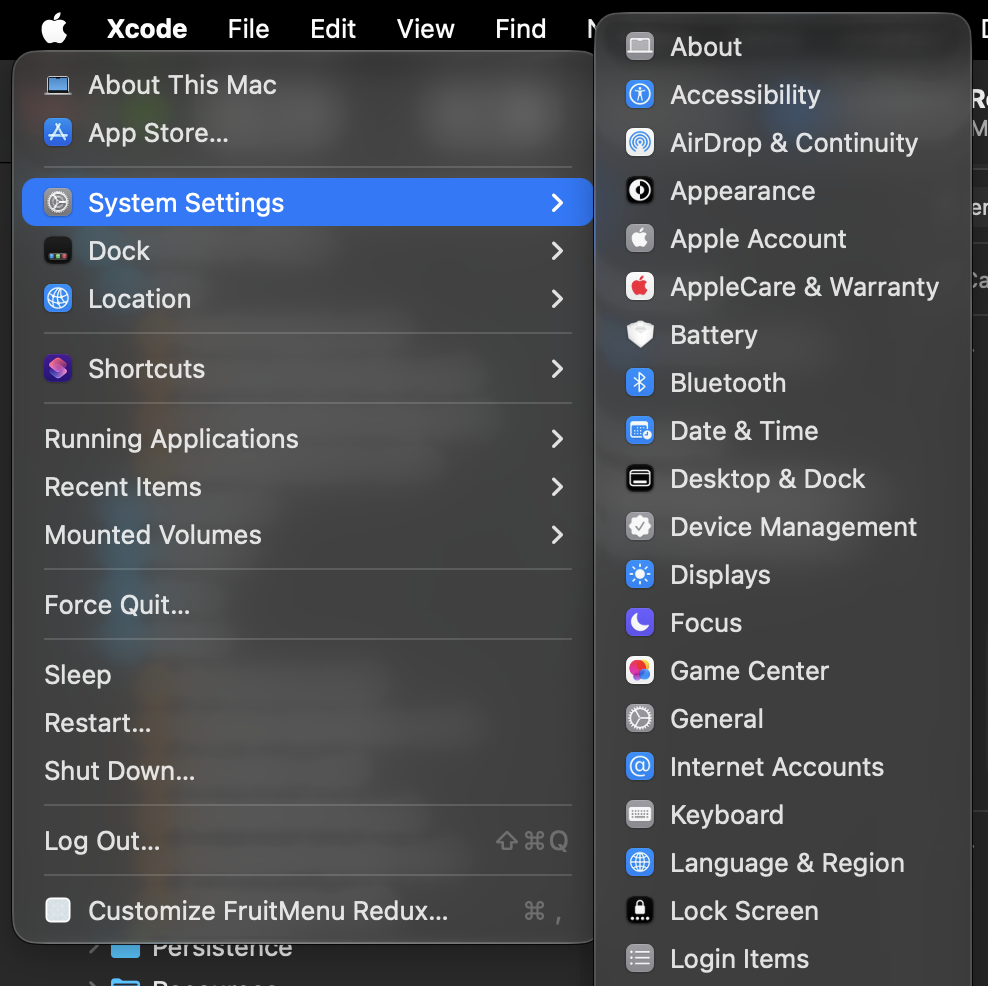
The hardest part to port was definitely the hierarchical list of System Settings panes since newer settings aren’t based on Mac OS X prefpanes. Instead, Apple’s settings are application extensions (appex) using an undocumented extension point, com.apple.Settings.extension.ui. Listing all of those would be easy enough, but certain settings extensions only appear and function when specific configurations are enabled or when the system finds particular hardware configurations.
For example, “CD/DVD” settings only appear if a CD or DVD drive is attached to the Mac. “Class Progress” shows up only when a specific Classroom preference is set. Because restricted entitlements aren't available, I can’t directly query System Settings extensions to ask whether they should be shown. Instead, I created a heuristic to determine which settings can’t be shown on my Mac and, after some reverse engineering, educationally assumed they can’t be displayed on most Macs.
I think I got it down. But just in case, if you hold option while opening System Settings, it shows which settings FMR decided can’t load and why.
Even worse, some System Settings change their names based on the computer’s configuration. For example, the “Power” settings extension becomes “Battery” if the computer has a battery and “Energy Saver” if it does not.
It’s definitely where I spent the most time on reverse engineering and troubleshooting, but it was definitely a key feature I just had to implement. I mean, the entire point of the original FruitMenu was to bring back the hierarchical menu.
What were the biggest disappointments?
SwiftUI Menus. SwiftUI submenus cannot be built dynamically. While I was building all the above features (excepting Shortcuts support), I was using SwiftUI’s MenuBarExtra to drive menus. I really, really wanted FMR to use as much SwiftUI as possible, Disappointedly, during testing of the Recent Items feature in the menu, I hit an edge case that put ~/Library/Application Support/ in the Recent Items list. This caused every single folder and every single file inside to be iterated upon, an icon extracted, and a menu item to be created to represent the folder/file. FMR’s memory ballooned exponentially and it caused the system to kill FMR.
Because SwiftUI doesn’t support dynamic menus, I had to rewrite all the menu code to use AppKit’s NSStatusItem and NSMenu as NSMenu is now a first-class citizen on macOS and fully supports dynamic submenu building. This means that FMR doesn’t even try to build the contents of a folder under you actually attempt to show the contents of the folder. Not only is this significantly faster, but it also uses significantly less memory.
Family Circle. There’s a Family Settings System Settings extension at /System/Library/ExtensionKit/Extensions/FamilySettings.appex that I really wanted to be able to show (if applicable) in the System Settings submenu. However, it dynamically builds items to show in the System Settings sidebar. The System Settings app (with its restricted entitlements) asks Family Settings what items it should show, if any, any Family Settings returns entries for each family member.
I tried reverse engineering System Settings, FamilySettings.appex, and some frameworks it links to but could not find any signal whatsoever I could access from an unentitled application like FMR to determine if FMR should show the Family Settings entry in the System Settings menu. Sigh.
Next Steps
Once Apple transitions my developer account, I can implement Sparkle for updates and release FMR betas almost immediately afterward.

Aside from that, FruitMenu Redux desperately needs an icon. The old one is lovely but low-resolution. I could make an AI slop icon for betas, but I prefer not to use AI slop icons.
But what will it cost?
I’m thinking of charging a nominal fee (an introductory $7 or something to honor the original FruitMenu price) for each item in the “Haxie Redux” line (not a real name) when they’re finally ready for release, with an extra “pay-more-if-you-want” option, if possible. I don’t know if that’ll cover expenses and pay rent, though.
While GoFundMe doesn’t permit licenses in exchange for donations, all beta users can get free licenses once I implement it. The details for requesting the license will be in the beta’s ReadMe. The beta will be available to all who want it on the Totally Not Malicious Software page.