Coming Soonish: FruitMenu Redux

First, this project needs funding. Go here if you wish to help, even a little bit. Thanks so much; all help is greatly appreciated!

What’s the holdup on betas?

Apple. Apple’s the holdup. I can’t even notarize software.

On Tuesday, August 11th, 2026, I was finally able to file for a Limited Liability Company (LLC). On Wednesday, August 12th, 2026, my LLC was approved without paying for expedited service. I then converted my Individual Apple Developer account to an Organization account. I want the software I release to use the name I’ve been using for over a year when filing privacy bugs with Apple. I’ve worked hard to make “Totally Not Malicious Software” known, and I want to use it as my software company name. Between Saturday, August 15th, and Sunday, August 16th, Apple responded and requested my LLC form and government ID, both of which I quickly provided. I haven’t heard anything from Apple since Sunday (August 16th), when they said they were escalating it to their “Senior Adviser Team.” Whatever that is.

Sadly, while a developer account is in transition, you can’t use some “membership benefits”. This includes the inability to notarize software. Because Xcode can’t find the name associated with my developer ID account, it displays “No Account for Team <Team ID>” and won’t even attempt notarization. I’m therefore unable to distribute software, even using my old Team ID, until Apple transitions my account.

Let’s talk about FruitMenu Redux
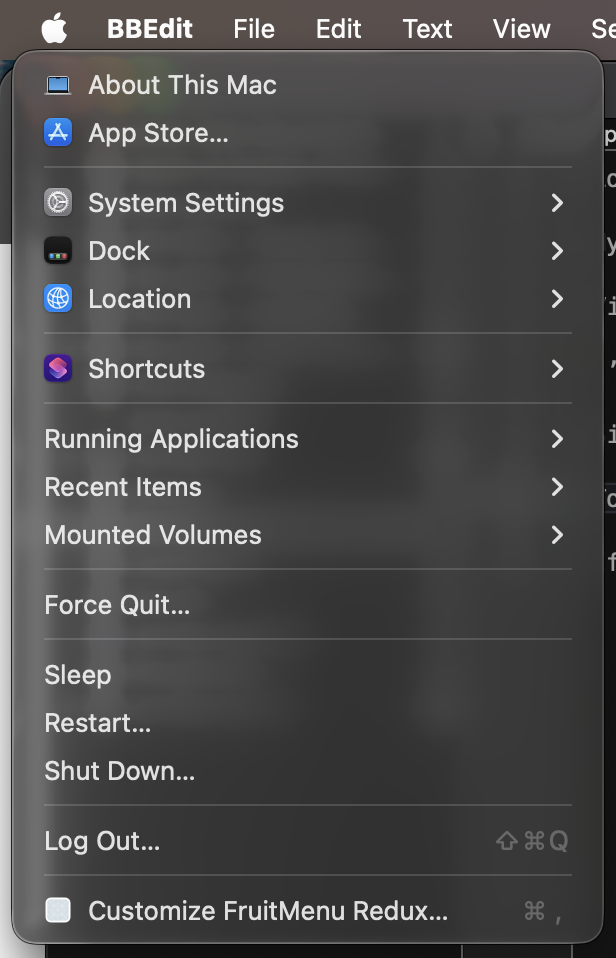
FruitMenu Redux’s menu, replacing the Apple Menu

That’s not the standard Apple Menu!

Like Xounds Redux, FruitMenu Redux revives a utility (FruitMenu) that brings lost Mac OS Classic features to Mac OS X. Specifically, it restores the fully customizable Apple menu.

Current Feature Set (as of August 23rd, 2026)

The first step was to implement every FruitMenu feature that’s still possible in the current macOS security environment. That immediately ruled out features requiring patching menus (sigh, I really miss patching menus) and features that require privileges now gated behind restricted entitlements. I also added support for viewing and executing Shortcuts. In all, you can add the following items to FruitMenu Redux menus:

  • About This Mac (also shows System Information when you press and hold the Option key)

  • App Store…

  • Customize FruitMenu Redux…

  • Dock (shows Dock settings)

  • File/Folder

  • Force Quit…

  • FruitMenu Redux Items (from a custom folder)

  • Get macOS Software…

  • IP Address (internal/LAN only, not external)

  • Location (Network)

  • Log Out (…)*

  • Menu Separator

  • Mounted Volumes

  • Recent Applications**

  • Recent Documents**

  • Recent Folders**

  • Recent Items**

  • Recent Servers

  • Restart (…)*

  • Reveal FruitMenu Redux Items

  • Running Applications

  • Shortcuts***

  • Shut Down (…)*

  • Sleep

  • Software Update…

  • Submenu

  • System Settings Panes (a hierarchical listing of System Settings panes)

*Log Out, Restart, and Shut Down are available with user confirmation (as shown ending in “…”) or without. Without confirmation, the system immediately logs out, restarts, or shuts down with no opportunity to cancel.

**Requires that Spotlight be enabled.

***Shortcuts is heavily entitlement-gated, so FruitMenu Redux (FMR) can only list and run Shortcuts; it can’t get the icons or any other metadata from Shortcuts. It also can’t pass a context to Shortcuts.

Some of these features prompt you for necessary permissions when you first use them. For example, “Force Quit…” requires System Events, so the system asks you if FMR can control the computer box. This also means FMR cannot be sandboxed and, therefore, cannot appear in the Mac App Store. What’s the point of sandboxing if you can ask an arbitrary process to do things on your behalf?

Additionally, you can set a hotkey to any item you add to FruitMenu Redux!

What was the most difficult?
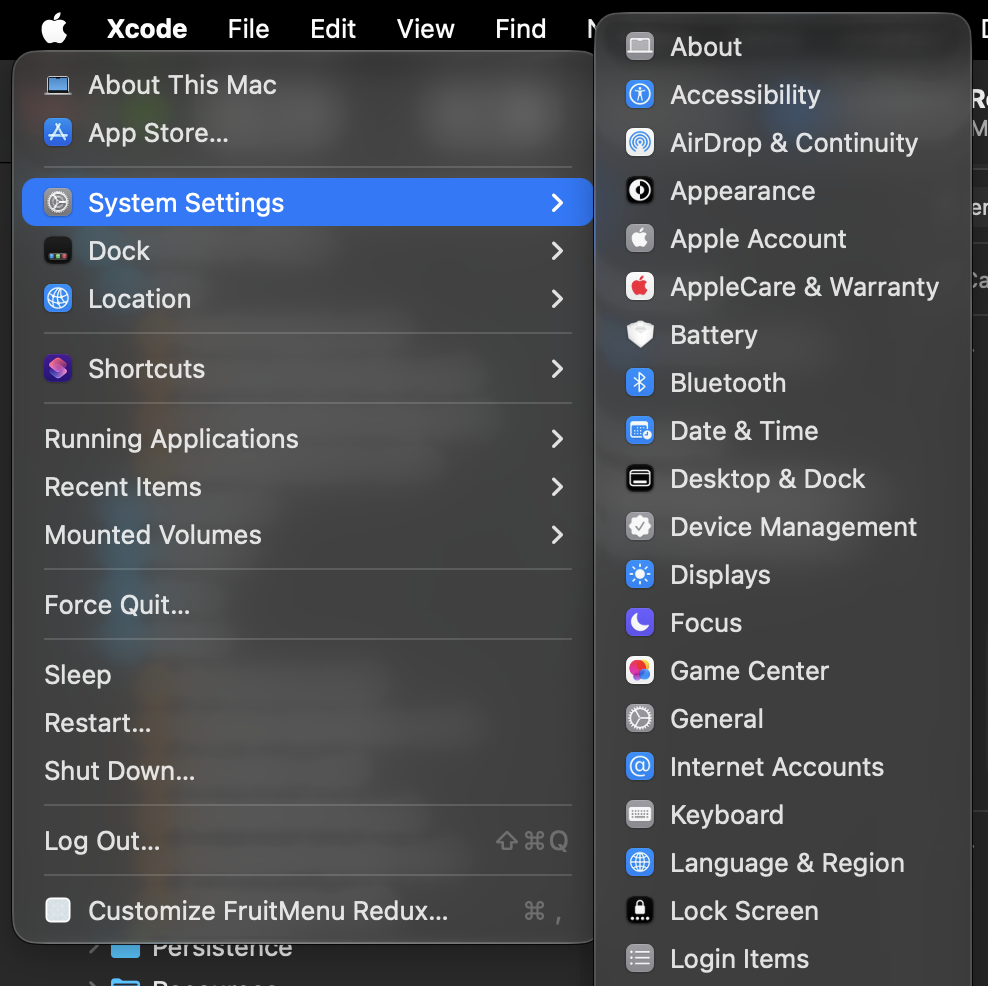
FruitMenu Redux’s menu with system settings expanded

The hardest part to port was definitely the hierarchical list of System Settings panes since newer settings aren’t based on Mac OS X prefpanes. Instead, Apple’s settings are application extensions (appex) using an undocumented extension point, com.apple.Settings.extension.ui. Listing all of those would be easy enough, but certain settings extensions only appear and function when specific configurations are enabled or when the system finds particular hardware configurations.

For example, “CD/DVD” settings only appear if a CD or DVD drive is attached to the Mac. “Class Progress” shows up only when a specific Classroom preference is set. Because restricted entitlements aren't available, I can’t directly query System Settings extensions to ask whether they should be shown. Instead, I created a heuristic to determine which settings can’t be shown on my Mac and, after some reverse engineering, educationally assumed they can’t be displayed on most Macs.

I think I got it down. But just in case, if you hold option while opening System Settings, it shows which settings FMR decided can’t load and why.

Even worse, some System Settings change their names based on the computer’s configuration. For example, the “Power” settings extension becomes “Battery” if the computer has a battery and “Energy Saver” if it does not.

It’s definitely where I spent the most time on reverse engineering and troubleshooting, but it was definitely a key feature I just had to implement. I mean, the entire point of the original FruitMenu was to bring back the hierarchical menu.

What were the biggest disappointments?

SwiftUI Menus. SwiftUI submenus cannot be built dynamically. While I was building all the above features (excepting Shortcuts support), I was using SwiftUI’s MenuBarExtra to drive menus. I really, really wanted FMR to use as much SwiftUI as possible, Disappointedly, during testing of the Recent Items feature in the menu, I hit an edge case that put ~/Library/Application Support/ in the Recent Items list. This caused every single folder and every single file inside to be iterated upon, an icon extracted, and a menu item to be created to represent the folder/file. FMR’s memory ballooned exponentially and it caused the system to kill FMR.

Because SwiftUI doesn’t support dynamic menus, I had to rewrite all the menu code to use AppKit’s NSStatusItem and NSMenu as NSMenu is now a first-class citizen on macOS and fully supports dynamic submenu building. This means that FMR doesn’t even try to build the contents of a folder under you actually attempt to show the contents of the folder. Not only is this significantly faster, but it also uses significantly less memory.

Family Circle. There’s a Family Settings System Settings extension at /System/Library/ExtensionKit/Extensions/FamilySettings.appex that I really wanted to be able to show (if applicable) in the System Settings submenu. However, it dynamically builds items to show in the System Settings sidebar. The System Settings app (with its restricted entitlements) asks Family Settings what items it should show, if any, any Family Settings returns entries for each family member.

I tried reverse engineering System Settings, FamilySettings.appex, and some frameworks it links to but could not find any signal whatsoever I could access from an unentitled application like FMR to determine if FMR should show the Family Settings entry in the System Settings menu. Sigh.

Next Steps

Once Apple transitions my developer account, I can implement Sparkle for updates and release FMR betas almost immediately afterward.

The old FruitMenu icon

Aside from that, FruitMenu Redux desperately needs an icon. The old one is lovely but low-resolution. I could make an AI slop icon for betas, but I prefer not to use AI slop icons.

But what will it cost?

I’m thinking of charging a nominal fee (an introductory $7 or something to honor the original FruitMenu price) for each item in the “Haxie Redux” line (not a real name) when they’re finally ready for release, with an extra “pay-more-if-you-want” option, if possible. I don’t know if that’ll cover expenses and pay rent, though.

While GoFundMe doesn’t permit licenses in exchange for donations, all beta users can get free licenses once I implement it. The details for requesting the license will be in the beta’s ReadMe. The beta will be available to all who want it on the Totally Not Malicious Software page.
Coming Soonish: Xounds Redux and Other “Haxies Redux”

First, this project needs funding. See below for details, and go here if you wish to help in any little bit. Thanks so much; all help is greatly appreciated!

In the days of yore, “Haxies” were small utilities that heavily customized Mac OS X, either through eye candy or productivity tools, under the Unsanity banner. The initial Haxies like Xounds and FruitMenu were designed solely to bring back Mac OS 8-Mac OS 9.2.2 features (interface sounds and a customizable Apple menu, respectively), with gusto, to Mac OS X. They worked by injecting code into every process at a deterministic time to modify the runtime behavior of GUI applications. However, such an injection is no longer tenable under the current security model unless you’re willing to disable every vital security feature. While I’m extremely proud of what we achieved at Unsanity and I miss these small utilities every day, I’m never going to ask users to completely disable all security features like that now that they’ve been implemented. It would make me a massive hypocrite, given how hard I push for a secure computing environment.

I made/helped make haxies. I loved them. I miss them. I’ve wanted them back for a long time. I think I know how to do it now.

“Haxies Redux” (not an actual name, more of a concept really) is my project to bring back some Haxies in a completely isolated form, without injection, by heavily…let’s say “leveraging” macOS Accessibility features. This necessarily means the feature set of each possible Redux version must change. I currently have an advanced prototype of Xounds Redux working that restores menu sounds, slapping control sounds, and window manipulation sounds. I’m pretty proud of where it is right now, though it still needs a few behavioral changes. Additionally, FruitMenu Redux and Menu Master Redux look extremely possible based on weaker prototypes.

Granted, the feature sets of these must depend entirely on what can be done with the Accessibility APIs — bugs, warts, and all. I chose “Redux” to signal that these aren’t the same pieces of software they were before and that they’ll have different feature sets, while still evoking pleasant memories of what used to be. Nostalgia is the name of the game.

Enter Xounds Redux

This video is about sound, so make sure sound is enabled when you view it.

I determined Xounds to be the most difficult of the multiverse of possible Haxies to bring to modern macOS, and, because of that, decided to tackle it first, as one does.

Current Feature Set (as of 10 August 2026)

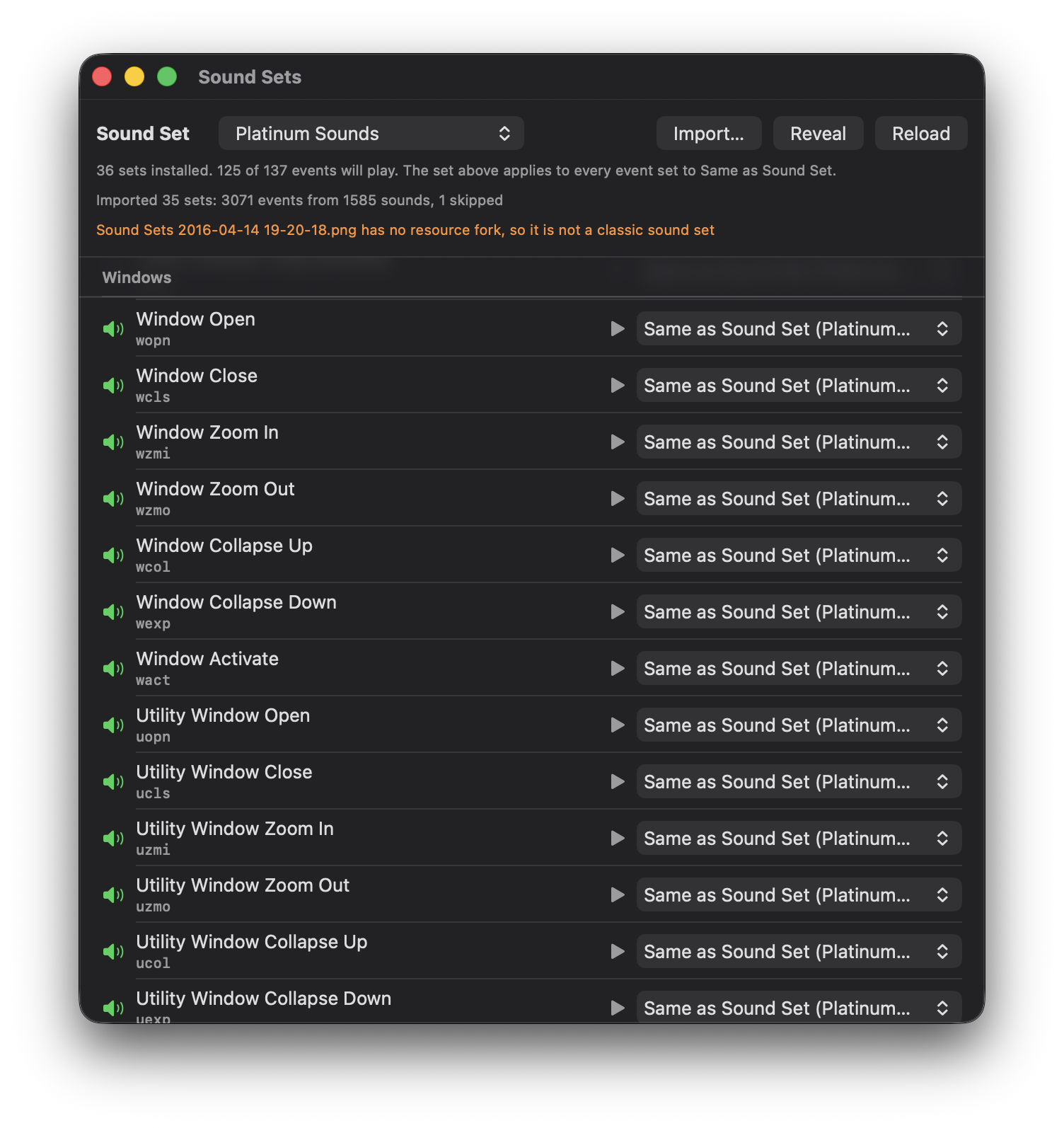
The first thing Xounds Redux needed was a sound set to work with, so I implemented support for importing Xounds Xoundsets and older, resource-fork-based Sound Sets from Mac OS 8-9. Given their wide availability on the internets and the depth of their coverage, it was essential to support importing both formats in Xounds Redux. This was (surprisingly!) the most difficult part of making Xounds Redux, because the Resource Manager swaps the endianness of some resources (like `snd ` resources) while not flipping the bytes of others (like `snd#` resources). This caused some weird debugging errors. Grr.

A screenshot of a listing of events in a Xoundset

Xounds Redux imports Sound Sets encoded in either µLaw or PCM format. It does not import MACE-encoded `snd ` resources because those might require QuickTime, although I didn’t encounter any in my limited testing of 35 sound sets. Imported Sound Sets are converted to 16-bit CoreAudio File (.caf) files to maximize compatibility with both current and future versions of macOS.

Xounds Redux supports a subset of the 137 possible events to which the original Xounds could assign sounds. It may be ironicle, but Accessibility features mean that, technically, Xounds Redux could support more events than Xounds did! Tell me if you want to call out any specific event and assign a sound to it. Some events can’t be supported at all, either because macOS no longer has the feature (such as using controls at the end of scroll bars or drawer-related events), or because there’s no way to intercept those events.

Hey! Listen!

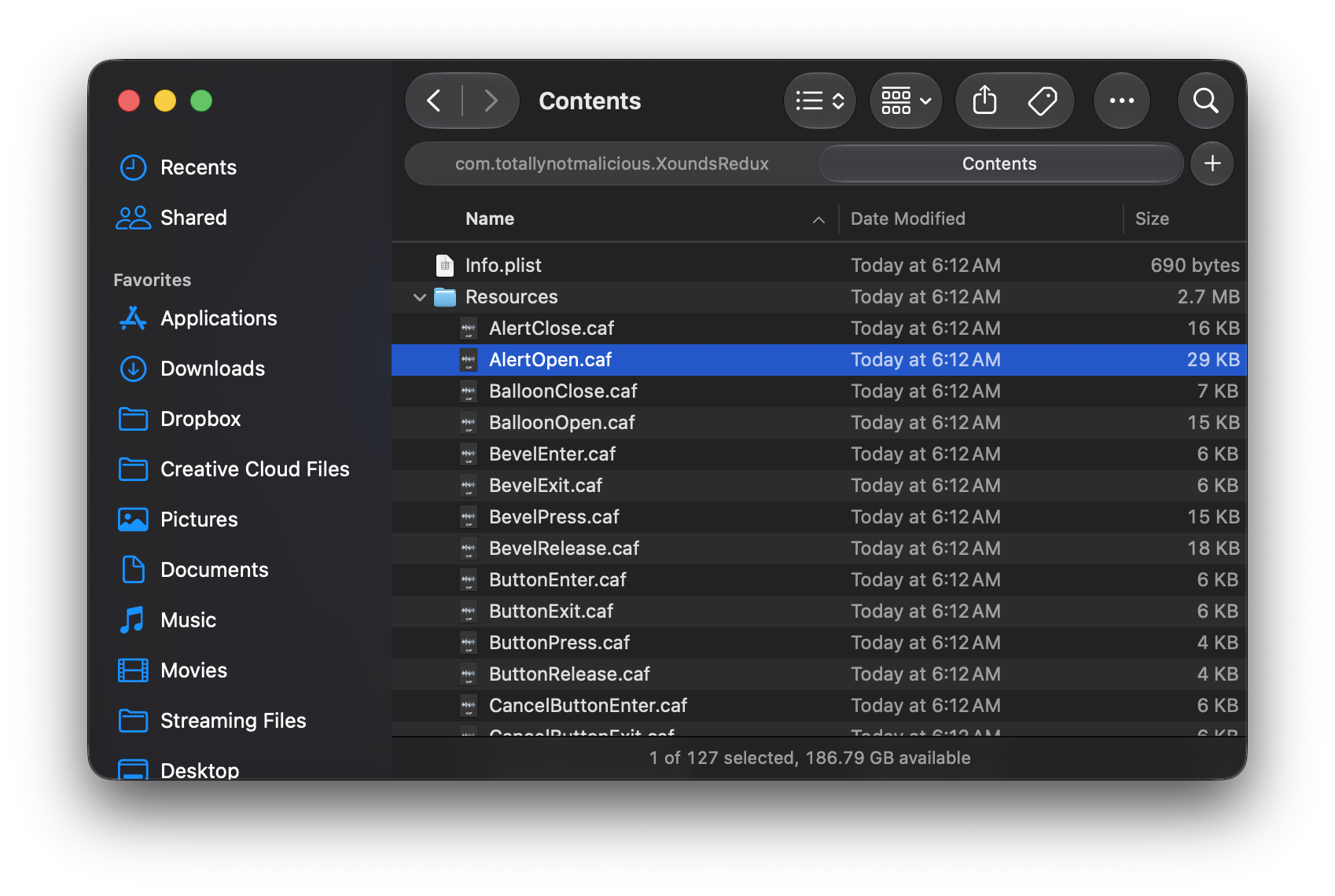
Xounds Redux ultimately (kind of) supports most of the sounds the old Theme Manager dealie in the HIToolbox thingy sent during its event loop. A list of these is in Appearance.h (look for ThemeDragSoundKind). A Xoundset can link to these event types in its Info.plist file. Xounds Redux introduces Xoundset v2: the same format as the Xoundset v1 .xoundset folder, except it’s a proper bundle that stores sounds in any audio format macOS natively supports in the Resources folder (instead of being a flat collection of sounds).

A screenshot showing the insides of a Xoundset v2 bundle

I plan to ship Xounds Redux with the limited Xounds Xoundset from the original Xounds. If anyone’s talented and willing to volunteer time and at least mediocre skillz, I would greatly appreciate it if it could be extended. I’ve got no talent with sound…

What’s Still Needed

Things I still need before beta (aside from the list below) include an exclusion list (some apps just shouldn’t play sounds during certain events) and making Xounds Redux less noisy in specific apps. Just writing this in Pages repeatedly plays the “selection change” sound, and mousing over the dock sounds like a Geiger counter in Chernobyl. (I even tried it again with my nose: same problem.)

The old Xounds icon

Xounds Redux also desperately needs an icon. The old icon for Xounds (seen above) is lovely, but it’s low resolution. I could make an AI slop icon for betas, but I don’t really want to use AI slop icons at all.

Finally, you should be able to export custom Xoundsets, so you can share all the wonderful mappings and audioscapes you’ve (eventually) created.

I haven’t yet decided whether I want Xounds Redux to be a System Settings pane or a standalone app with a to-be-determined interface.

Caveats

Because Xounds Redux depends heavily on Accessibility notifications, it works best in apps with native controls that send these notifications for free, automatically. For middleware like Electron or apps that decide to roll their own controls, it will depend on whether the app developer has properly implemented Accessibility notifications.

But what will it cost?

I’m thinking of charging a nominal fee ($7 or something to honor the original Xounds price) for each item in the Haxie Redux line when they’re finally ready for release, with an extra “pay-more-if-you-want” option, if possible. I don’t know if that’ll cover expenses and pay rent, however.

Funding Help and Next Steps

Aside from needing icons, I first need to form an LLC to manage Haxies Redux before I can release one, even in beta, even to a limited audience. Forming and maintaining an LLC in California is expensive compared to other states, costing about $900. I need help to afford this and other costs associated with starting a new business.

After the LLC is formed, I can get a DUNS number. Then I’ll need a website for Haxies Redux, probably a subpage on this domain since I already pay for this website. Once the website is up and I have the DUNS number, I can convert my Apple Developer account from an Individual Account to a Corporate Account. I’ll also need to figure out how to let people download the software and how to configure Sparkle to update it. Squarespace doesn’t exactly allow you to host random downloads unless you use their store, so I’ll need to address that as well. If anyone has suggestions, I’d appreciate them.

Once that’s all done and the first betas are out, the next step is to integrate a payment processor that handles taxes, remits sales tax, and manages currency conversion, among other things. I’m thinking of using Lemon Squeezy because they handle almost everything financial and there’s a third-party Swift SDK for integrating them with macOS apps. Alternatively, Stripe’s Managed Payments is an option, but they don’t support payments from China for some reason, and that’s a huge segment of the market to ignore. I really want to support China too. However, I am open to suggestions for other payment providers.

One of the problems we had at Unsanity was that we quickly saturated the market of potential Haxie buyers, and we ran out of new customers to reach. I had thought about making Haxies Redux a subscription of about 18-20 months to address that issue, but I can’t find any payment processor/Merchant of Record that supports such long subscription terms.