
Announcing WindowShade Redux 1.0*!
/First and Foremost℠: You can download WindowShade Redux 1.0.2 from https://totallynotmalicious.com/software if you want to play with it while you read this. Read the last paragraph if you’re a journalist or post about new software products and want a free discount code. Each application has a 14-day free trial.
WindowShade Redux 1.0 (WSR) is the third entry in what you might call a “Haxies Redux” line—not a real name, but one used here for nostalgia and exposition. These utilities re-create beloved features that Apple provided in Mac OS 8 through Mac OS 9.2.2 (or earlier), and that we at Unsanity later brought to Mac OS X 10.0 through Mac OS X 10.6.8 with our haxies.They do so within today’s security constraints, including System Integrity Protection, which makes traditional haxies nigh impossible unless you find and exploit a security vulnerability. Although the modern macOS security landscape prevented some features from returning, it also gave us an opportunity to rethink the core architecture and add capabilities that the original WindowShade X never had.
General Overview
WindowShade Redux’s Temporary ICOn
A beloved piece of software returns for modern macOS and modern security expectations. WindowShade your windows! Minimize windows in place! Float your windows above all others!
Instead of only cramming minimized windows into a crowded dock—or hiding them altogether—WindowShade Redux reduces your windows to their title bars or small live thumbnails at all times. It supports over twenty animation styles with the following power features:
Minimize the window to the Dock, as always
WindowShade the window into a tiny strip to quickly peek below or get it out of the way
Minimize-In-Place the window so it becomes a really small thumbnail that you can freely drag the thumbnail around your screen
Make any window float on top so it will never be obscured by other windows
Hide any application quickly
Choose what every minimize action, with or without modifiers, actually does. You can make the system ignore double-clicks on title bars if you do that when you don't mean to.
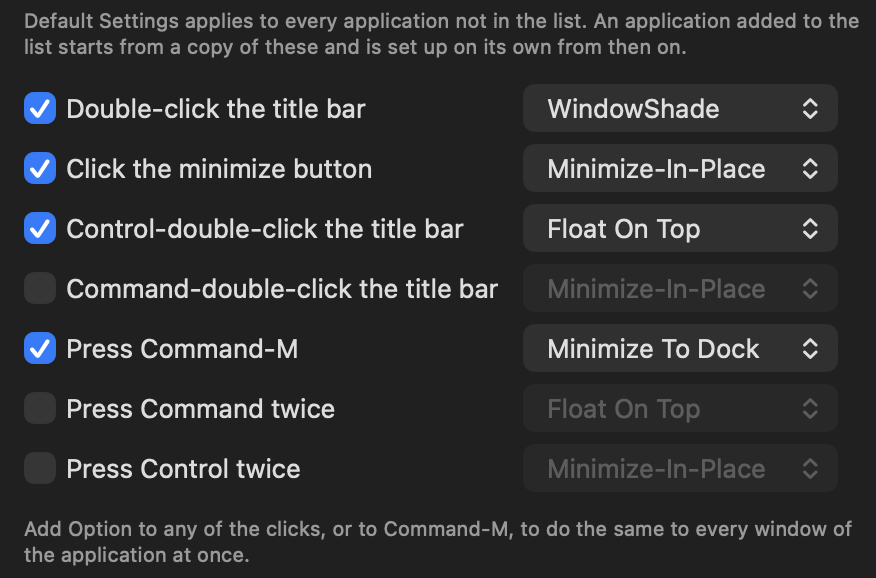
WindowShade Redux requires macOS 26.7 or later (including macOS 27) and an Apple Silicon Mac, as I don’t have an Intel-based Mac to test with. It’s available now for a ridiculous $7 introductory price, or with a 25% discount if you buy WindowShade Redux with either FruitMenu Redux or Xounds Redux, or with both.
Feature Showcase
This video showcases all the features and animations in WindowShade Redux as of version 1.0.2. You can always view the latest WindowShade Redux Feature Showcase with the latest animations by going to https://updates.totallynotmalicious.com/windowshade-redux/feature-showcase
Some Technical Tidbits to Nosh On.
Faking Fakery
WindowShade X, the old haxie, used to directly manipulate window shapes, sizes, and translucency to do its magic. Modern macOS no longer allows one process to change the geometry of a window owned by another process (application), so I had to redesign and rewrite the core from scratch. Now, WindowShade Redux fakes everything hard.
Instead of changing window geometry (a problem waiting to happen if WindowShade X crashed), WindowShade Redux takes a snapshot of visible windows, composites them into an image, and displays it either as a fake WindowShade window or as a Minimize-In-Place (MIP) thumbnail to hide the Dock’s 500-millisecond genie animation. It then tears down the fake window.
Floating on top was an entirely different beast, as it requires constantly recording the target window and laying a new WindowShade Redux window on top of it. This fake window is then moved in tandem with the real window below it.
False Starts
WindowShade Redux versions before 1.0.2 tried to manipulate a window’s content size if the Accessibility APIs indicated it was possible. Some (but not all) windows have a minimum height. For those that don’t, WSR would perform the WindowShade action by setting the window’s content size to encompass only the title bar (or the toolbar, if visible). This was instant, and therefore very smooth, but it didn’t include any animations because, once the content size was reduced, there was nothing left to hide.
This had a few issues:
It made initial animations slow as WSR had to first ask the app if a window had a minimum height (WSR would cache the response).
It was inconsistent: some windows showed animations, while others just shaded.
It caused weird problems for some users, like Mona 6 and 4D maximizing windows instead of minimizing them on double-clicks on the first WindowShade.
It could cause problems if WSR quit unexpectedly and wasn’t relaunched while a window’s content size was being manipulated.
So, for WindowShade Redux 1.0.2 and later, WSR no longer attempts to do a real content size change at all. It always does the fakery.
While reverse-engineering the Dock (as one does), I found an NSUserDefaults (defaults read/write on the command line) request for “genie-speed” that controlled the speed of the genie effect when minimized to the Dock. The default is 0.5 (or 500 milliseconds). I hoped this would be a way to completely eliminate the need to hide the minimize-to-the-Dock animation by having the window immediately disappear if the time was set to 0.0.
Reader, it did not. No matter what speed I tried for the genie-speed default, or how many times I set it, the genie effect always took 500 milliseconds. Then I remembered macOS protects certain auto-relaunching apps, like the Dock and SystemUIServer, to prevent crash loops. Killing the Dock after each defaults change seemed to trigger the protection and prevent my genie-speed changes from taking effect. After waiting a while before killing the Dock, it worked!
WindowShade Redux now includes a “Make the Dock minimize and restore windows instantly” option. This option is off by default because it requires changing another app's settings and killing the Dock. If you enable it, your old Dock settings are saved so that, if you later disable the option, your original settings are restored.
Addicted to Animations
I always wanted to add arbitrary animations to WindowShade X for Minimize-In-Place and WindowShading actions. I really, really badly wanted to do them. So badly. This just wasn’t tenable on Mac OS X between 2001 and 2012.
But suddenly… yay!
First, Apple introduced Metal, and then Apple introduced Apple Silicon Macs that have excellent basic graphics performance for pointless animations. I absolutely love pointless, over-the-top animations (as you can clearly see in the video above). And because the necessary fakery required to hide the genie animation was in place, I finally had the perfect opportunity and place to implement such animations.
And so I did. Over and over and over again.
I’ve found that adding animations (over 20 as of this writing) to be extremely stress-relieving. And I’ve had a lot of stress lately. I can imagine a simple animation (or watch an anime that makes me think of an animation), whittle it down to a few core elements, and implement it semi-quickly. The hardest part is making it make sense in under a second and keeping it fast. Each frame needs to draw completely within a few milliseconds. This has made some animations impossible. For example, the extremely long Knights of the Round summon would be fun to implement, but it uses a lot of motion and is quite long. I don’t know how to simplify it into an animation.
If you have suggestions or animation feature requests, please contact support with your ideas. I love making these animations. I think I’ll make at most three new animations per WindowShade Redux point release.
Animation Analytics
As part of my addiction and current hyper-fixation on making animations, I’d really like to know which animations people are using (if any; you can choose “None” as an option, too). To reach this goal, WindowShade Redux 1.0.3 and later will send super tiny telemetry that includes the current macOS version, which animations the user has chosen, and, in the future, which animations the user absolutely hates. This telemetry doesn’t include a UUID or any other unique ID, and the IP address, although sent (as is the nature of the internets), shall not be retained. Period.
Speaking of telemetry, I use Amazon CloudFront to serve files, including the Sparkle appcast, from Amazon’s S3 service. The appcast request is where the telemetry is collected. However, to view the telemetry, I need to enable logging on my CloudFront account, which costs at least $15/month ($180/year). That surprised me, since everything else in Amazon’s Web Services (AWS) is pay-as-you-go and cheap (much, much less than a penny per unit of thing). Seeing non-real-time logging cost 1,500 pennies per month just to get started was a shock. I could use a CloudFront function (as I do for the feature showcases to redirect them to unlisted YouTube videos) and log to CloudWatch, but that has numerous downsides.
So I’m wondering: what do independent macOS developers typically use to store and view telemetry sent via Sparkle? You can find ways to contact me on the About page or contact me via the socials, publicly or privately.
*Some Last Words
We’ve obviously revved WindowShade Redux 1.0 a few times in response to user feedback. I also highly recommend browsing all the settings in WindowShade Redux to see what the software can do!
You can also keep up with updates to WindowShade Redux via its release RSS feed.
Road to 1,000 [Sales]
I’m trying to reach 1,000 sales before 12:00 am on November 1st, 2026. To help reach that goal, WindowShade Redux is reduced from $10 to $ 7 each until October 31st, 2026. Buy more than one of (WindowShade Redux, FruitMenu Redux, Xounds Redux) at the same time, in the same transaction, and save 25%.
How do indie developers promote products nowadays?
This is a big ask of everyone: please share this post. It’s been 14 years since I used to send out press releases for Unsanity after making a new version of the software, and I have no idea how to promote independent software anymore. All the major publications I used to send email product releases to—MacCentral, MacNN, MacInTouch, MacFixIt, VersionTracker, et cetera—are gone now. I have no idea who to contact. I feel so old.
For the Press:
If anyone writing about software wants a free 100% discount on WindowShade Redux, FruitMenu Redux, and Xounds Redux (to cover them), please contact support@totallynotmalicious.com from a company email address, or contact me on social media using an associated social media profile. I accept DMs on most platforms. I don’t like most platforms, but I accept DMs on them!