
How to Fingerprint Users
/Apple vs? Google and the hidden war for your identity
Please read this first
I’m really low on money right now. My credit card is maxed out, and I only have extremely little funds in my bank accounts of this writing. I can’t afford food, medication, internet access, medical services, or the Bay Area’s rent. My rent is overdue due, and if it’s not paid within the month, they’ll start the eviction process. My main goal is to be able to pay the exorbitant rent for one or two months and take care of my mental health and other medical needs until I have a steady income. Any help would be greatly appreciated. I have set up a GoFundMe here.
Any bounty I’m due for existing privacy leaks won’t arrive for months, if they arrive this year. See here¹ for more details.
The very best thing you could do for me is hire me! I could be improving your apps, frameworks, shared libraries, or almost anything else! Click here² to read why you need me!

A Baphy plushie surrounded by his emotional support capybaras
What is a fingerprint?
A fingerprint is a unique device profile built from seemingly harmless signals and data points. You gather different pieces of data, combine them, apply a mathematical operation (such as hashing), and then use the resulting value to uniquely identify a person, device, or app.
Remember the saying that if you don’t pay for something, you’re not the customer; you're the product? You might be the product even if you pay for it. Advertisers and other companies that sell you as a product really want to differentiate you from every other user in a given region, which can be as small as a household or as large as the universe.
Let’s consider a simple example of some unfriendly code running on your iPhone. It could be an app, a third-party SDK, a middleware layer, or something else—that doesn’t matter. Whatever it is, it can significantly reduce the number of people sharing the same “iPhone” fingerprint by obtaining your iPhone's Model ID, which we’ll say is “iPhone18,2”. (This corresponds to an iPhone 17 Pro Max.) This narrows your group to fewer than “all iPhone users.” The code then retrieves your iPhone's storage tier; now you’re part of an even smaller group of “all iPhone 17 Pro Max 512GB users.”
Still too broad? It can then get the color of your iPhone's external shell. Now you’re in the cohort of “all Cosmic Orange iPhone 17 Pro Max 512GB users.” Then the code might add which Liquid Glass features you have disabled, because each disabled feature adds another data point that distinguishes you from other Cosmic Orange iPhone 17 Pro Max 512GB users.
Once it finishes creating a fingerprint, our unfriendly code sends it to its unfriendly authors over the internet. Even that causes harm. You might have iCloud Private Relay enabled, but since it doesn’t work with encrypted connections in third-party apps (with rare exceptions), the server can still see your IP address. This leaks at least your region (or household), which could be the last piece needed to identify you globally.
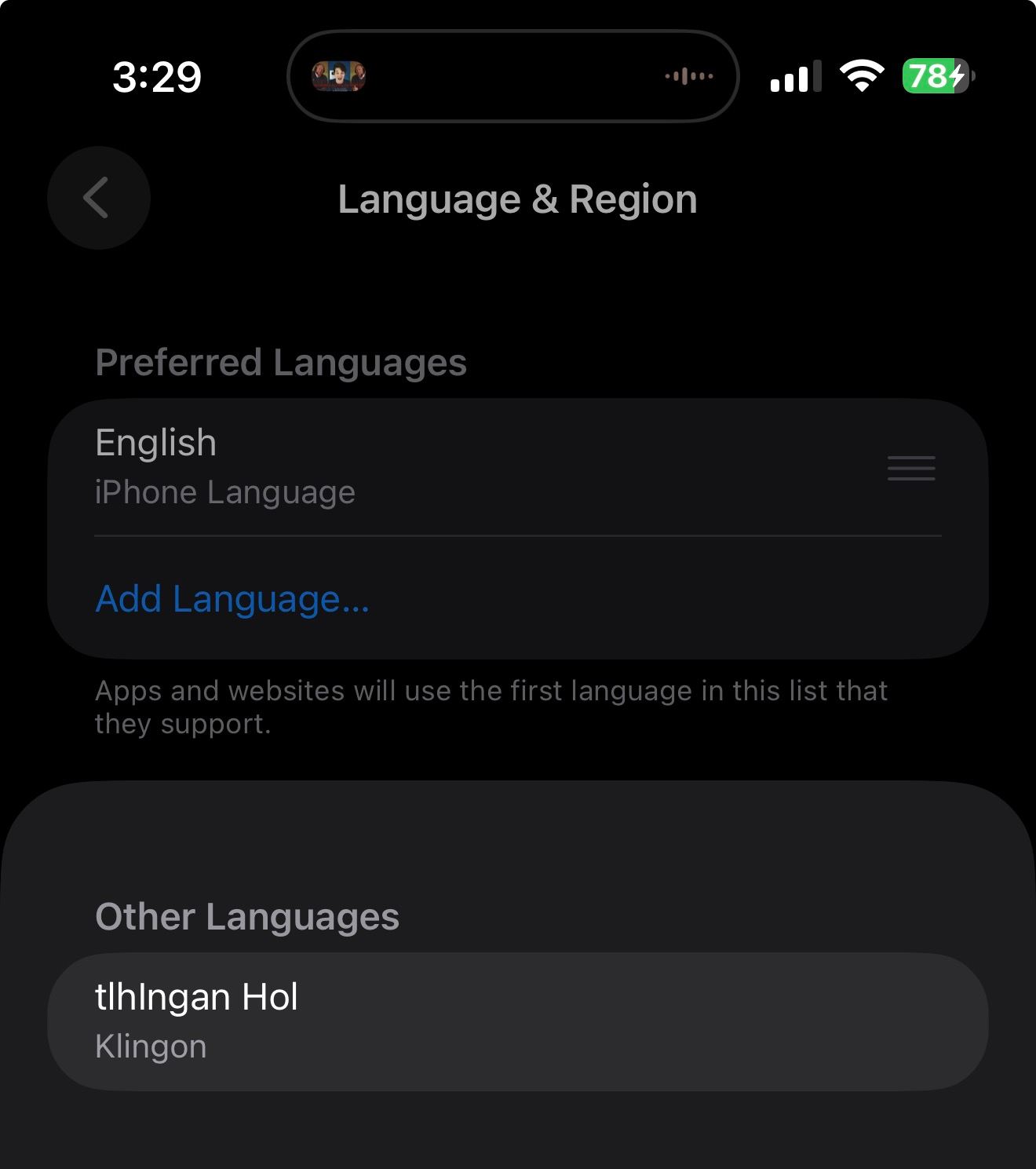
Real Language & Region settings on the iPhone
Even worse, since you love jokes, you’ve added Klingon as a supported language to your iPhone’s settings, not realizing that makes you stick out like a sore thumb in any fingerprint!
For information about web-based fingerprinting (rather than code-based), I recommend reading WebKit’s article. If you want to learn about the physical fingerprints on your skin, I suggest watching Professor Dave’s video.
Why does it matter?
You already know you’re an ad target, and you probably also know that the more advertisers learn about you, the more valuable you become to them. If you are or have ever been part of a marginalized group, especially under an authoritarian regime, you may also worry that you—individually or as a group member—are of interest to people who wish you harm. Privacy matters.
The data needed to fingerprint you is already on your device, and some apps do need parts of it. Games need display details. Certain apps need to know which languages you read. Routing apps require your location. But does a game need to know which app answers your calls? Does a food delivery app need to know if you have Telegram installed? Does your church’s app need to know whether you use Tinder—or Grindr?
Fingerprinting can reveal all of that and more, and that’s what I’m trying to prevent. Here, I compare Google’s third-party app APIs that can be abused for fingerprinting, with the APIs Apple has allowed, restricted, or fixed based on my reports.
Apple and Google can give their own apps access to sensitive data without granting the same access to third-party apps. If you sign in to an Apple device with an Apple Account or an Android device with a Google Account, those companies already have enough information to identify you across apps and devices. That’s what those accounts are for. But apps like Facebook (the Adversary) or Mobile Passport Control (MPC) should never be able to fingerprint you across other apps and devices. For instance, MPC discovering that you have Grindr installed could be…problematic.
So even if Apple or Google collects certain fingerprintable data, they don’t need to expose it to third-party apps. Google may be an advertising company, but it has no legitimate reason to broadly share sensitive fingerprinting data with others.
This article may seem to favor Apple, but that’s not my aim. I’m no sycophant; I’ve been clear about my issues with Apple, especially around delayed or denied bounties. As I wrote the API comparisons, it became clear this is less about “what Apple does better than Google” and more about “how to fingerprint users on iOS.”
The Mechanics of Fingerprinting
Being able to fingerprint or target users largely depends on compiling the data types that uniquely identify a user’s device.
Timestamps
For example, having a timestamp for a service, especially one with sub-millisecond accuracy, is all you need to uniquely identify a user. It’s highly unlikely that any other user in the world would have generated the exact same timestamp for that service as another user. This allows tracking across apps on a single device. For example, consider the AuthKit privacy leak I reported, which was fixed in iOS 26—it leaked a specific timestamp so precise that it acted as a globally unique identifier on its own.
Apple is fully aware of the risks that timestamps pose for tracking purposes and requires you to mark your use of any APIs that can return high-resolution timestamps.
UUIDs and DSIDs
UUIDs, or Universally Unique Identifiers (see also GUIDs) are opaque identifiers for any type of data that are almost certain never to conflict with each other. Because of this, they are commonly used to uniquely identify devices and users. If you find something that returns a UUID that is the same across applications on a device, it becomes easy to track a user, at least on iOS. Many UUIDs are created specifically for use within a single app, while others are generated by different background daemons for sharing across multiple apps. If you gain access to these shared UUIDs, you can track a user across several apps until the device is rebooted, which may cause session-specific UUIDs to be regenerated.
DSIDs are the numerical account numbers that identify Apple Accounts (formerly Apple IDs). An Apple Account can link to multiple email addresses, but it can only have one DSID. To me, obtaining the DSID is like finding the holy grail of fingerprinting. It is globally unique and can be shared across devices (such as macOS, iOS, and others). If I have it, that’s all I need to track you. For example, I discovered that iOS had a privacy leak that allowed access to all DSIDs associated with a device- for instance, if you were signed into iCloud and had different accounts for app purchases across multiple stores- simply by syncing the device with iTunes. This issue was fixed in iOS 26. (What DSID abbreviates for is still up for debate. It could be Directory Service ID or something more differenter.)
I have reported four different DSID leaks on iOS 26.x. Two of them were fixed in iOS 26.0, one involving the Calendar and one involving iTunes syncing. The other two that I reported remain. Frankly, I believe Apple should at least offer a $5,000 bounty for obtaining the DSID because of how uniquely unique it is.
Fun Fact: Only Homo sapiens have chins. If you ever find a lower mandible, you can immediately determine if it belonged to a modern human or not!
Device Name
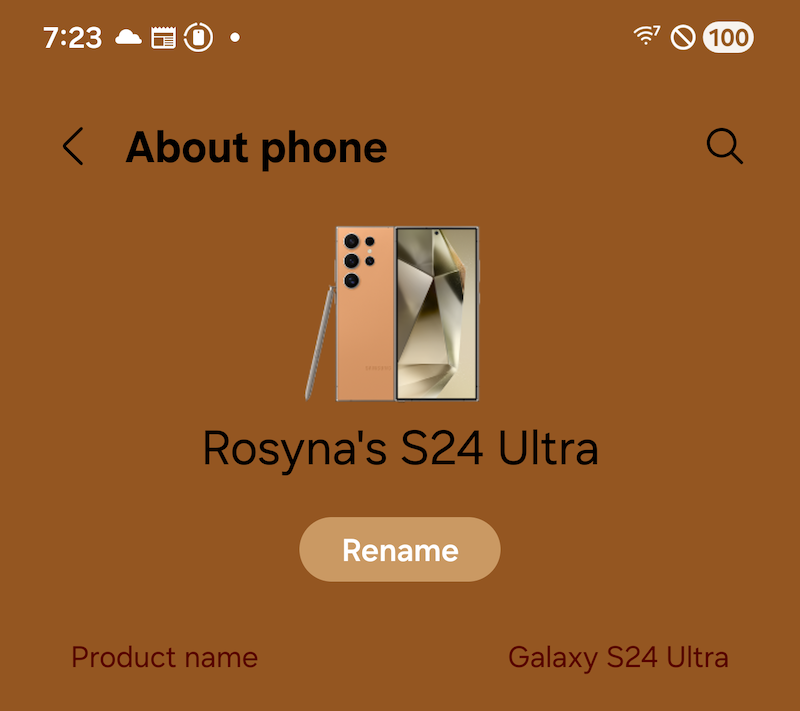
Device name showing in Settings on Android
The device name is the user-assigned name of the device, like “Rosyna’s iPhone” or “Rosyna’s S24 Ultra.” Both Samsung and Apple devices automatically set their names during setup when you provide your account login details (Apple Account or Samsung Account, respectively). This highly disambiguates a device and is absolutely great for fingerprinting when combined with signals from other fingerprinting techniques. Many devices also automatically include your name in the default device name. Other devices, such as the Pixel, simply default to the product's marketing name, like “Pixel 8 Pro”.
The device name is used in Bluetooth sharing/discoverability, hotspot sharing, AirDrop/QuickDrop, when a device joins a Wi-Fi network, and in other situations where multiple devices in a small area (like a home, office, or home office) need to be distinguished from one another. So even if an Android OS version doesn’t automatically set it to include your name, you, as a user, may want to set it so you can recognize the device from another device.
Android requires no permissions whatsoever to acquire the device's name (despite what Google Gemini claims). Just get the DEVICE_NAME value from Global Settings; the API is entirely unrestricted. Google doesn’t appear to consider it personally identifiable information (PII).
On iOS, after years of developers, malicious libraries, and advertising SDKs abusing UIDevice.current.name, iOS 16 and later versions hide it behind a restricted entitlement, com.apple.developer.device-information.user-assigned-device-name. To obtain a restricted entitlement on iOS, you must contact Apple via a form (requires an Apple Developer Account to access), explicitly request the entitlement, explain why you require it (such as disambiguating multiple iOS devices attached to an account, like PagerDuty to Netflix), and promise not to use an SDK that requests it or transmits it to another party.
Sadly, iOS 16 didnt’ completely lock down the device name. It wasn’t competely locked down until the bug I reported (CVE-2026-28877) was fixed in iOS/watchOS 26.4. (Get there!)
For backward compatibility, if you don’t have the proper restricted entitlement on iOS 16 and later, your app will only display the generic product name, such as “iPhone” or “iPad.” You won’t even see a fancy marketing name like “iPhone 16 Pro Max.”
Cellular Carrier
Getting just the cell phone carrier name and/or the PLMN code (which includes a country code and carrier code, like T-Mobile in Germany versus T-Mobile in the US) for your carrier might seem like a minor detail. Sure, it might make it easier to group your devices and provides an additional unique signal when everything else is equal, but there’s a much darker side to it...
However, let me share a true story first. Back in late 2016, I was interviewing for a security job at Apple. At that time, Apple required you to fly to Cupertino for in-person interviews after passing the telephone interviews and whatnot. When I arrived at my hotel in Cupertino, I checked my T-Mobile settings to ensure their “HD Pass” was enabled so I could watch HD Netflix and Crunchyroll while I was there, since the Wi-Fi was not fast enough. While not on Wi-Fi, I opened the T-Mobile website on my iPhone. It didn’t ask for any login info. I found that strange, so I tried opening it in a private “tab.” Same result. It didn’t ask for login info. “WTF, T-Mobile?!,” I thought. I cleared all my cookies just to be safe. Still the same: no login required.
The website used my T-Mobile network connection to skip the login process.
Sadly, it also showed me every single line and phone number I had, all my devices, my name, and allowed me to download a PDF of every past bill for at least seven years. The bills included every number I called, every number that called me, all the numbers I exchanged texts with, my entire physical address, and the last four digits of my payment method. It was an identity thief’s dream!
To test a theory, I created a new project in Xcode, embedded a WebView that visited T-Mobile’s website, and reproduced the issue. This was bad—very bad. This was also before T-Mobile had a Bug Bounty Program, so they had no way to report the problem to the right team. Reporting it by calling 611 wouldn’t work because “it’s a feature!”
I knew something had to be done because it was a huge privacy concern. So, during my interviews at Apple, as soon as I spoke with a manager, I reported it to them. I figured I might not be able to do much, but surely Apple could pressure T-Mobile a little to fix it quickly.
After I got the job, I was able to see the progress of the bug that was filed. It took about 3-6 months (IIRC) for T-Mobile to finally close its massive hole.
Many carriers try to “make things easier” by allowing users unauthenticated access to certain API endpoints without logging in when connected to the carrier’s network. You can’t fully realize how much information or what actions they can perform, especially if a malicious or ad SDK exploits that special privilege to upload your carrier name and/or PLMN code to their servers and return API endpoints that can be abused without authentication. They might even be able to charge your account if your carrier permits you to purchase unrelated items, including ringtones or apps, which can be charged to your cell phone account.
On Android, to get the carrier name, simply call TelephonyManager.networkOperatorName and/or TelephonyManager.simOperatorName (especially helpful if you’re on an MVNO like Google Fi). To obtain the PLMN code, call TelephonyManager.simOperator so you at least know which country to query. No permissions are required to access this information.
Apple put the functional equivalent of the information in CTCarrier behind a restricted entitlement, com.apple.CommCenter.fine-grained, in iOS 16. The APIs still exist; they just return two dashes instead of actual values when the entitlement is missing. (I found a bug CVE-2025-46292, which leaked information about the current carrier despite the entitlement. Apple fixed that in iOS 26.2 et fam.
Android Fragmentation, Features, and Model IDs
As everyone knows, the Android ecosystem is monstrously fragmented. Dozens of manufacturers offer myriad models with theatrically varying hardware features. Some manufacturers even use different branding to target specific demographics or to create the illusion of more competition within certain markets. For three examples:
BBK Electronics spawned the Oppo, OnePlus, RealMe, Vivo, and iQOO brands.
Huawei created Honor to make Huawei-branded phones seem “more premium.”
Xiaomi birthed POCO and Redmi.
Even when a single company doesn’t produce multiple brands, Android devices are often sold as white-label products, either entirely or partially, allowing other companies to rebrand and sell them as their own. (See also the example of the non-existent Trump Phone.) Additionally, other Android manufacturers launch phones tailored to more market segments than you might have thought existed.
All of this adds up to a lot of different phones with a lot of different hardware features. This makes fingerprinting a user based on hardware feature availability, especially camera features, very effective at distinguishing individuals. If you hash various hardware features, flags, and metrics (camera, display, battery, et cetera) together, especially for a device that doesn’t sell millions of units, you can get a value shared by few global users. Millions of Galaxy devices might share the same specs, but the knock-off your cheap relative bought at “Slammin’ Samuel’s Smartphone Steals” probably does not. I’ve discovered that some of these phones even provide the globally unique serial number for a specific part.
However, iOS devices generally have the same components across all units of the same model. In most cases, simply obtaining the Model ID is all the signal you’ll get—or need. To find the Model ID (for example, “iPhone17,2"), just use uname().machine. You can find tables that map Model IDs to marketing names online or create your own if you need to show the user the marketing name.
The other cases involve users replacing broken parts or upgrading with non-Apple components. This shouldn’t change the Model ID, but there’s no way to know if third-party parts match factory specs. If you replace a broken screen with a higher-spec third-party screen, it may or may not indicate its specs to the device. For safety, it's best if the screen pretends to be the original, avoiding information that could make the repair detectable, and therefore easier to fingerprint.
Android does have similar functionality by combining Build.MANUFACTURER and Build.MODEL, but note that on some lower-end Android devices, these values might be lying liars or truthfully insufficient to distinguish device features, which is why other hardware feature queries are used to fingerprint Android devices.
A Conclusion
First, I’d like to say many thanks to my friends for their encouragement, help, and editing, and to their grammar checkers for their help. I really appreciate the clarity they added to this article.
I hope you get a chance to read Google’s final paper (it’s open access!) on Malicious/Ad Tracking SDKs on Android, as I only “responded” to the list of fingerprint signal APIs they included in their pre-print paper to compare them with what’s possible to fingerprint on iOS. I didn't expect this article to turn into “this is how you track iOS users."
Please encourage and insist that all operating system vendors eliminate as many signals as possible, not only to safeguard privacy but also to protect people! Demand that carriers stop allowing you to bypass authentication in your web browser!
And remember, even though it’s funny, don’t add Klingon to the list of languages you want to see on iOS. I haven’t found a single app localized for Klingon, so it’s just a way to fingerprint you.
SulaDta'mo', Satlho'
This post is sponsored by Mountain Dew Baja Blast.
Appendix E: List of Google APIs used by snoopy SDKs and their iOS equivalents
Note: Some Android APIs require permissions to access certain features, and I’ll try to note them explicitly. I’ll also mention if a feature is available on iOS but needs an entitlement—for example, an entitlement anyone can obtain or a restricted entitlement that requires Apple’s approval. Unfortunately, both iOS SDK and Android SDK documentation are very limited when it comes to listing the permissions and entitlements needed to use a feature. They should be listed on the same page and in the same section that details the API arguments and return types. Unfortunately, that’s not always the case.
This section (and article) is based on the Google APIs listed in Section E of the paper “Fingerprinting SDKs for Mobile Apps and Where to Find Them: Understanding the Market for Device Fingerprinting” by Michael A. Specter, Mihai Christodorescu, et fam.
android.accessibilityservice.AccessibilityServiceInfo: getResolveInfo(), getSettingsActivityName()
This seems to be used to get a list of installed apps matching specific criteria on Android.
On iOS, Twitter ruined the ability to get a list of installed apps because they were being misused for fingerprinting and advertising. See also: canOpenURL:. Getting a list or partial list of installed apps on iOS was once eligible for a $5000 bounty. I’m not sure if they still pay that much now.
android.accounts.Account: name
android.accounts.AccountManager: getAccounts(), getAccountsByType(com.google)
This aims to retrieve the Google account linked to the device. It now needs explicit permissions to access.
On iOS, there’s no public way to access the Apple Account, DSID, or any details about the current user. There used to be a playerID option for GameCenter that provided a universal identifier, but it’s now scoped by vendor.
android.app.ActivityManager getDeviceConfigurationInfo(), getRunningAppProcesses(),
getRunningTasks(), isUserAMonkey()
android.app.ActivityManager$MemoryInfo availMem, lowMemory, totalMem
android.app.ActivityManager$RunningTaskInfo numRunning
android.app.TaskInfo baseActivity(), numActivities(), taskId()
The ActivityManager APIs can be used to fingerprint certain device characteristics, such as the amount of available memory. Historically, they also exposed information about other running apps and tasks. However, in recent Android versions, access to system-wide running tasks and processes has been heavily restricted for privacy and security reasons. Calls that once returned a broad view of all running apps now typically return only the tasks associated with the calling app’s own process, rather than a complete system-wide list.
On iOS, you can call host_statistics64() to retrieve memory statistics. While total memory isn’t a reliable fingerprint signal because knowing the model ID (obtained with uname()) tells you the memory capacity, calculating a “fuzzy" available memory value can be used to track a user across apps.
Similar to Android, Apple doesn’t allow access to a list of running apps that aren’t your own. In fact, doing so was worth a $5000 bounty. (See CVE-2025-46276).
android.app.KeyguardManager isDeviceSecure(), isKeyguardSecure()
These functions tell the SDK whether the user has configured a secure lock screen (vs one without a passcode, pattern, or PIN) or if they have a SIM card locked with a PIN. This gives an additional bit of information for fingerprinting users.
On iOS, you can call LAContext.canEvaluatePolicy() to determine if a user has enabled a passcode. Apps like banking or line-of-business (LOB) apps have a legitimate reason to know this, especially if they want to ensure the user has a passcode set up.
android.app.UiModeManager getCurrentModeType()
This API gives the current device type. (Watch, appliance, TV, headset, et cetera)
On iOS, UIUserInterfaceIdiom identifies the device type, but uname() offers better data for user fingerprinting.
android.app.WallpaperInfo getPackageName()
android.app.WallpaperManager getDrawable(), getWallpaperInfo()
These APIs obtain highly sensitive information about the device’s current wallpaper. Hashing such information is extremely useful if you want to fingerprint the device’s owner. Fortunately, these calls are gated behind permissions. However, if an app uses a malicious or advertising SDK, that code gets the same permissions as the host app.
I’m currently, actively looking for an equivalent SPI (private API) on iOS to get similar information.
android.app.admin.DevicePolicyManager getActiveAdmins(), getStorageEncryptionStatus()
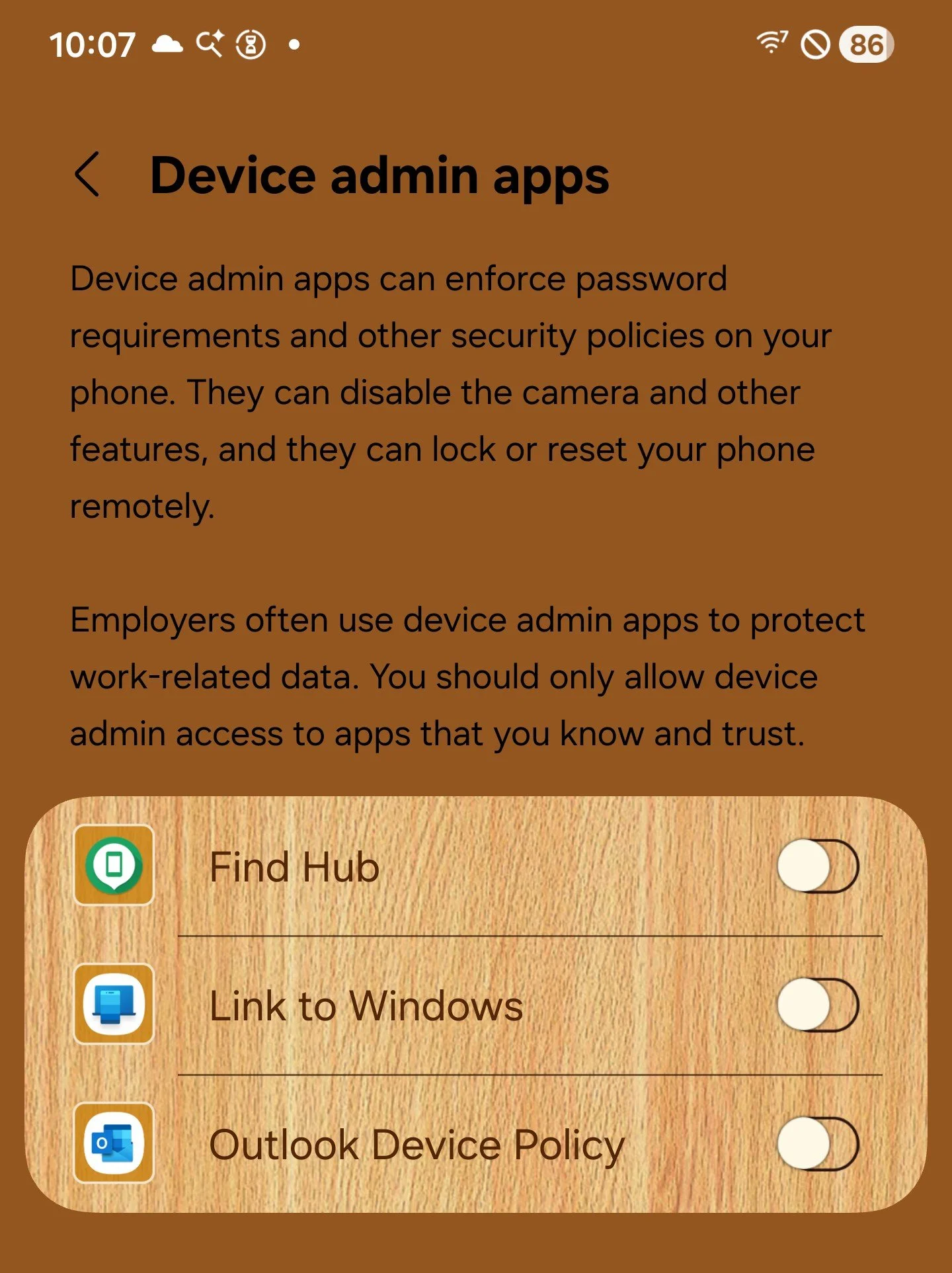
These are considered “admins” for the purposes of the Android API
Here you’ll find flags to help fingerprint a user. getActiveAdmins() lets you retrieve the list of device administrator apps enabled on the device, as shown above.
On iOS, storage is always encrypted. iOS allows multiple apps to control settings (MDM), but there are no public APIs to get the list of MDM solutions installed.
android.app.usage.StorageStatsManager getTotalBytes()
Returns the total available storage space on the Android device. This isn’t the same as free space and can be used to help fingerprint a user, as flagship phones usually have multiple storage tiers.
On iOS, you can get the total available size in bytes with volumeTotalCapacityKey, There is a huge warning in the documentation about not using it for fingerprinting users, but developers may choose to ignore it.
android.app.usage.UsageStats getPackageName()
android.app.usage.UsageStatsManager queryUsageStats(INTERVAL_DAILY)
Provides usage statistics for various apps within a specified time range. If the user hasn't explicitly granted permission, it only provides usage stats for the currently running application.
On iOS, you must use the Family Controls APIs (including ScreenTime) which requires the restricted entitlement, com.apple.developer.family-controls.
android.bluetooth.BluetoothAdapter getAddress(), getBondedDevices(), getDefaultAdapter(), getName(), getScanMode(), getState(), isDiscovering(), isEnabled()
Provides information about Bluetooth devices. Requires extensive permissions and user approval. Again, if a host app obtains these permissions, malicious or advertising SDKs can hijack them.
iOS has Core Bluetooth. It also requires permissions and user approval. The same malicious or ad SDK abuse can occur here.
android.content.ClipboardManager getPrimaryClip(), getPrimaryClipDescription()
Gets the current contents of the clipboard. It only shows a brief notification that a paste occurred if an app automatically tries to access the clipboard to scan for sensitive information.
iOS has UIPasteboard. If the paste action isn't done through standard methods like tapping the system Paste button or pressing Command-V, a dialog box alerts the user that an app is accessing the pasteboard and asks for permission.
android.content.ContentResolver query(Uri(content://com.google.android.gsf.gservices)), registerContentObserver(android.provider.MediaStore$Images$Media.EXTERNAL_CONTENT_URI)
Obtains a key-value store from an internal Google Services Framework provider. It contains some sensitive information that’s useful for fingerprinting, but since Android 8 it just throws an exception.
Registering content observers for images notifies the registering app when it detects any changes to the media store (what most users would call “the photo library”). That includes adding new screenshots, deleting images, or changing any existing images. Code receiving this notification could, for example, upload the image to its own service. The app must have permission to read images for code within it to receive this notification.
ContentResolver.query() doesn’t directly correspond to any single API on iOS. On Android, it was used to access private settings, and there are many undocumented ways to retrieve private settings on iOS, like in CVE-2025-43449.
On iOS, registering for image changes is the job of PHPhotoLibrary.register(), which also requires explicit user permission.
android.content.Intent getIntExtra(health), getIntExtra(plugged), getIntExtra(scale), getIntExtra(status), getIntExtra(temperature), getIntExtra(voltage), getStringExtra(technology)
These functions provide extremely valuable battery statistics for fingerprinting attempts across different applications on the same device. For instance, battery voltage can change as batteries age, which may help track users over time. Developers don’t need such methods to connect their apps, since both Android and iOS offer options to enable a developer’s own applications to share data with each other. However, malicious or advertising SDKs lack these capabilities, and they are often the ones seeking to share information.
The iOS equivalent, UIDevice.isBatteryMonitoringEnabled = true, only provides the state (charging, full, unplugged) and charge for the battery at the time of invocation. It’s still useful for fingerprinting users, but it becomes less reliable over time as the charge level continuously fluctuates.
android.content.pm.ApplicationInfo flags, loadLabel(), sourceDir
android.content.pm.ConfigurationInfo reqGlEsVersion
android.content.pm.InstallSourceInfo getInstallingPackageName()
android.content.pm.PackageInfo firstInstallTime, lastUpdateTime, packageName, receivers, requestedPermissions, requestedPermissionsFlags, services, signatures, signingInfo, versionCode, versionName
android.content.pm.PackageItemInfo metaData, name, packageName
android.content.pm.PackageManager checkPermission(), getApplicationLabel(), getInstallerPackageName(8), hasSystemFeature(android.hardware.fingerprint), hasSystemFeature(android.hardware.location.gps), hasSystemFeature(android.hardware.sensor.accelerometer), hasSystemFeature(android.hardware.sensor.compass), hasSystemFeature(android.hardware.sensor.light), hasSystemFeature(android.hardware.telephony), hasSystemFeature, hasSystemFeature, queryIntentActivities(), resolveActivity(android.content.Intent(``android.intent.action.CALL''))
android.content.pm.SigningInfo getApkContentsSigners()
I grouped these APIs together because they all provide important metadata about your device. This includes information about the applications that are installed, who signed them, what installed them, as well as the features of your device and its location. These APIs are frequently used by snoopers not only for device fingerprinting but also for detecting emulators and identifying if a device has been jailbroken.
hasSystemFeature() is used for fingerprinting because Android devices widely vary.
The resolveActivity(android.content.Intent("android.intent.action.CALL")) function helps you find out which apps on your device can make and receive phone calls.
On iOS, information that was once accessible through the MobileInstallation private framework has been removed due to misuse and is now stored in the secure and heavily protected LaunchServices database, which cannot be mapped into processes.
These kind of “does this hardware feature exist” APIs aren’t as needed iOS, since uname() returns the model ID (like “iPhone17,2”) and hardware features, excluding storage tiers, are consistent across model IDs.
android.content.res.Configuration getLocales(), locale, orientation, screenLayout, uiMode
android.content.res.TypedArray getDimensionPixelSize()
Data such as locales and screen metrics rarely (if ever) change, making them good targets for fingerprinting.
On iOS, you can use NSLocale.preferredLanguages to fingerprint a user in the same way. It usually returns a single language, but multilingual users can configure a preferred order of languages. (If you prefer Greek but there is no Greek text available for a string, you might prefer French over English, so the method returns your preferred languages in order. This can be especially identifying if you add Klingon to your language list.)
android.hardware.Sensor getName(), getName(), getName(), getPower(), getVendor(), getVersion()
android.hardware.SensorEvent values
android.hardware.SensorManager getDefaultSensor(8)
These methods return the available sensors and information about them (including names and values). The sensor name and vendor can be used to fingerprint users; the sensor values can provide deeper information about them. Android has tried to limit the abuse of these sensor values by severely limiting frequency while an app is in the background.
Core Motion in iOS provides APIs to retrieve similar information. These APIs do not require specific entitlements, but you must declare their usage; otherwise, your app crashes like a Cybertruck hauling three grocery bags. Like other device information frameworks, background activity is heavily restricted. Additionally, using Core Motion to obtain information such as the vendor name is not particularly useful, as iOS devices are less fragmented. Instead, you can simply call the uname() function to get that information.
android.hardware.camera2.CameraCharacteristics CONTROL_AE_COMPENSATION_RANGE, CONTROL_AE_LOCK_AVAILABLE, CONTROL_AF_AVAILABLE_MODES, CONTROL_MAX_REGIONS_AF, FLASH_INFO_AVAILABLE, LENS_FACING, REQUEST_AVAILABLE_CAPABILITIES, SCALER_AVAILABLE_MAX_DIGITAL_ZOOM, SCALER_STREAM_CONFIGURATION_MAP, SENSOR_INFO_SENSITIVITY_RANGE, STATISTICS_INFO_MAX_FACE_COUNT
android.hardware.camera2.CameraManager getCameraIdList()
android.hardware.camera2.params.StreamConfigurationMap getHighSpeedVideoFpsRanges(), getOutputSizes()
You can enhance an Android device fingerprint, given the vast and wide differences in Android units, by adding specific camera capabilities like these.
There’s no need for this on iOS unless a camera is broken or repaired with a non-Apple part. Otherwise, using the model ID from uname() will provide all the necessary information about the device’s cameras.
android.hardware.usb.UsbManager getDeviceList()
Information about USB peripherals connected to an Android device can be used to track a user across different apps and devices, especially if one or more of the attached USB peripherals exposes a serial number.
You can’t enumerate USB devices directly on iOS without a specialized restricted entitlement, but there is the External Accessory framework for MFi devices over Lightning and Bluetooth connections. Any devices connected that way can return valuable fingerprinting information.
android.location.Location getAccuracy(), getAltitude(), getBearing(), getBearingAccuracyDegrees(), getElapsedRealtimeNanos(), getLatitude(), getLongitude(), getProvider(), getSpeed(), getSpeedAccuracyMetersPerSecond(), getTime(), getVerticleAccuracyMeters(), isFromMockProvider()
android.location.LocationManager: getBestProvider(), getLastKnownLocation(), isProviderEnabled(gps), isProviderEnabled(network)
These methods tell the caller where you are, which way you’re moving, and how fast you’re going. You must obtain explicit permission to access both fine and coarse information about the user’s location. When an app has this permission, malicious and advertising SDKs can exploit it to collect this personal data.
It’s the same on iOS: all location information requires specific user permissions, and if an app has those permissions, any associated fingerprinting SDKs will as well.
android.media.AudioManager: getDevices(), getRingerMode(), getStreamMaxVolume(), getStreamVolume(), isMusicActive()
These APIs provide information about audio devices that are connected to or available on an Android device. You can use this data to track users not just across different apps but also across multiple devices when the same audio hardware is used. If a malicious SDK notices your fancy headphones’ serial number on your phone, and also on your tablet, you’ve been fingered. Or printed. Or both.
Getting the iOS list of audio devices is gated by the restricted entitlement com.apple.avfoundation.allows-access-to-device-list.
android.media.MediaDrm: getPropertyByteArray(deviceUniqueId)
This API returns a semi-unique UUID for DRM queries, although developers have reported that some users may share these UUIDs.
On iOS, I believe this would be covered by AirPlay IDs, which are not accessible in apps approved for Apple’s App Store.
android.media.RingtoneManager getActualDefaultRingtoneUri(), getDefaultUri(), getRingtone()
These APIs enable fingerprinting by retrieving the current ringtone set on a device. The more distinctive the ringtone, the stronger the fingerprint.
On iOS, there is no way to retrieve the current ringtone or access a list of available ringtones. You can set a ringtone in your own CallKit app, but you cannot retrieve the system ringtones.
android.net.ConnectivityManager getActiveNetwork(), getActiveNetworkInfo(), getDefaultProxy(), getNetworkCapabilities()
android.net.NetworkCapabilities hasTransport(4) (is we VPN?)
android.net.NetworkInfo getState(), getTypeName(), isConnected(), isRoaming()
android.net.ProxyInfo getHost()
android.net.TrafficStats getTotalRxBytes(), getTotalTxBytes()
android.net.sip.SipManager isVoipSupported()
android.net.wifi.ScanResult capabilities(), frequency(), level(), SSID()
android.net.wifi.WifiInfo getBSSID(), getFrequency(), getIpAddress(), getLinkSpeed(), getMacAddress(), getNetworkId(), getRssi(), getSSID()
android.net.wifi.WifiManager calculateSignalLevel(), getConfiguredNetworks(), getConnectionInfo(), getScanResults(), getSSID(), is5GHzBandSupported(), isDeviceToApRttSupported(), isEnhancedPowerReportingSupported(), isP2pSupported(), isPreferredNetworkOffloadSupported(), isScanAlwaysAvailable(), isTdlsSupported(), isWifiEnabled()
These APIs enable extreme fingerprinting by retrieving Wi-Fi network details and statistics. The vast majority of them are hidden behind user permissions, since just having the SSID or BSSID of a network is enough information to find your physical location. This is also why you should never sign in to a hidden network—your phone (on any platform) broadcasts the SSID as you walk around, allowing people listening in to figure out where you live.
On iOS, you need either the com.apple.developer.networking.wifi-info entitlement or location permissions, since obtaining the SSID provides the location.
android.os.BaseBundle getBoolean(present), getLong(install_begin_timestamp_seconds), getLong(referrer_click_timestamp_seconds), getString(technology), getString(install_referrer)
These are part of the Google Play Install Referrer API and attribution ad campaigns, allowing code to know who referred a user to install a given package. They can be used by advertising SDKs for cross-app correlations. Their entropy is relatively high because they allow exact referrer information (e.g., UTM tokens). Google says the data persists from 7 to 90 days.
Apple has the AdServices framework for referrer information. The docs for attributionToken() have more information. Apple says the data lives for 24 hours from creation.
android.os.Build BOARD, BOOTLOADER, BRAND, CPU_ABI, CPU_ABI2, DEVICE, DISPLAY, FINGERPRINT, getRadioVersion(), getSerial(), HARDWARE, HOST, ID, MANUFACTURER, MODEL, PRODUCT, RADIO, SERIAL, SOC_MANUFACTURER, SOC_MODEL, SUPPORTED_32_BIT_ABIS, SUPPORTED_64_BIT_ABIS, SUPPORTED_ABIS, TAGS, TIME, TYPE, USER
android.os.Build$VERSION BASE_OS, CODENAME, INCREMENTAL, RELEASE, SDK_INT, SECURITY_PATCH
android.os.Build$VERSION_CODE FROYO, GINGERBREAD_MR1, GINGERBREAD, HONEYCOMB_MR1, HONEYCOMB_MR2, HONEYCOMB, ICE_CREAM_SANDWICH_MR1, ICE_CREAM_SANDWICH, JELLY_BEAN_MR1, JELLY_BEAN_MR2, JELLY_BEAN, KITKAT_WATCH, KITKAT, LOLLIPOP_MR1, LOLLIPOP
Except for the serial number, these stats are useful for fingerprinting an Android installation because of the vast number of Android device manufacturers. Even with Samsung, the same flagship model can use different SoC manufacturers by region.
Code can access the serial number only if it meets any of the following conditions:
The requesting app has been granted the READ_PRIVILEGED_PHONE_STATE permission, which is only available to apps preloaded on the device.
The requesting app possesses carrier privileges.
The requesting app is designated as the default SMS role holder.
The requesting app is the device owner of a fully-managed device, the profile owner of an organization-owned device, or has been delegated permissions from these roles.
On iOS, since builds don’t vary much, most information can be obtained or inferred from the results of uname() or ProcessInfo. To access something equivalent to getSerial() would require a highly restricted entitlement.
android.os.Debug isDebuggerConnected()
This just does what it says on the tin. Useful if you’re trying to hide sketchy code from basic reverse engineering, like stepping through code, but not that useful for fingerprinting itself.
On iOS, you’d use sysctl() and check for P_TRACED for the same information.
android.os.Environment getDataDirectory(), getExternalStorageDirectory(), getExternalStorageState(), getRootDirectory(), isExternalStorageEmulated()
These can be used to help fingerprint a device (like say, is an SD card attached?), check to see if a device is rooted, or as anti-debugging calls.
On iOS, if you want to check for external storage, et cetera, you’d have to go through either Document Pickers and save a security-scoped bookmark or go through File Providers, in which case a malicious or advertising SDK could be granted the same permissions to access the drive.
android.os.PowerManager getCurrentThermalStatus(), getLocationPowerSaveMode(), isDeviceIdleMode(), isInteractive(), isPowerSaveMode()
If we assume maximum maliciousness, malicious or advertising SDKs can use these to either detect an emulated environment or perform malicious actions only when the device isn’t in use. They’re not too good for fingerprinting, as these states are generally transient.
Not all of these signals are available on iOS. However, Apple does offer APIs like ProcessInfo.thermalState and ProcessInfo.isLowPowerEnabled that allow applications to reduce processor-intensive tasks when the device is overheating or needs to conserve battery. However, malicious code could exploit the same information to perform actions while the device might not be actively in use.
android.os.StatFs getAvailableBlocks(), getAvailableBlocksLong(), getBlockCount(), getBlockCountLong(), getBlockSize(), getBlockSizeLong(), getTotalBytes()
android.system.StructStat st_mtime
These methods allow for fingerprinting based on the total and free disk space available. They act as wrappers around functions like statvfs() and stat(), among others. While free space changes as you add or delete photos, messages, emails, and other data, the overall configuration of the disk remains constant.
I find it frustrating that iOS doesn't provide fuzzy values for certain capacities. These values can be obtained through functions like statvfs(), stat() et fam, or by using .volumeTotalCapacityKey and .volumeAvailableCapacityKey. There is a significant risk of misuse and tracking, which is why you must disclose the use of these APIs in your privacy policy.
android.os.SystemClock elapsedRealtime(), uptimeMillis()
These values represent the elapsed milliseconds since boot and can be used for fingerprinting. They allow for the correlation of information across applications on a single device. Malicious or advertising SDKs can include them, like timestamps, to help evaluate the validity of a fingerprint, or choose between different fingerprints with nearly-identical data.
I really don’t like that iOS doesn’t make these values fuzzy either. Use ProcessInfo.systemUptime or mach_absolute_time(). There is high potential for misuse and tracking, and using these APIs requires you to mention them in your privacy policy.
android.os.SystemProperties get(gsm.operator.isroaming), get(gsm.operator.numeric), get(gsm.sim.state), get(init.svc.qemu-props), get(init.svc.qemud), get(qemu.hw.mainkeys), get(qemu.sf.fake_camera), get(qemu.sf.lcd_density), get(ro.bootloader), get(ro.bootmode), get(ro.hardware), get(ro.kernel.android.qemud), get(ro.kernel.qemu.gles), get(ro.product.device), get(ro.product.model), get(ro.product.name), get(ro.runtime.firstboot), get(ro.serialno)
This is a hidden class and not part of the public SDK. The various “qemu” attributes are used to detect emulation. The ro.product.* attributes are basic product names used for either emulation detection or for fingerprinting. ro.runtime.firstboot can tell whether the device was just wiped (useful for detecting reverse engineering). The property ro.serialno is highly restricted, and attempting to access it without permission throws an exception.
Because iOS devices are less fragmented than Android devices, you can use the uname() function to obtain the device model. To get the device’s user-provided name, use UIDevice.name. Starting with iOS 16, accessing that name requires the com.apple.developer.device-information.user-assigned-device-name entitlement, at least if everything is working properly.
android.os.UserManager getSerialNumberForUser(), getUserProfiles(), isDemoUser(), isSystemUser(), supportsMultipleUsers()
If a device has multiple users, iterating over them lets you obtain persistent, unique user IDs (serial numbers) for each user. They’re valid for the device until the user is deleted and recreated. According to the documentation, these functions do not require the android.permission.MANAGE_USERS permission. Most phone devices have a single user whose serial number is 0.
iOS doesn’t really support users like Android does, but you can get similar signals (to see if there’s an MDM enrollment) by getting the UserDefaults key com.apple.configuration.managed, which requires you to explicitly mention using it in the app’s privacy policy.
android.provider.Settings$Global getString(adb_enabled), getString(airplane_mode_on), getString(airplane_mode_radios), getString(always_finish_activities), getString(animator_duration_scale), getString(auto_time), getString(auto_time_zone), getString(bluetooth_discoverability), getString(bluetooth_discoverability_timeout), getString(bluetooth_on), getString(boot_count), getString(data_roaming), getString(development_settings_enabled), getString(device_provisioned), getString(http_proxy), getString(mode_ringer), getString(network_preference), getString(stay_on_while_plugged_in), getString(transition_animation_scale), getString(usb_mass_storage_enabled), getString(use_google_mail), getString(wait_for_debugger), getString(wifi_networks_available_notification_on)
android.provider.Settings$Secure getInt(accessibility_enabled), getInt(mock_location), getString(accessibility_display_inversion_enabled), getString(allowed_geolocation_origins), getString(default_input_method), getString(enabled_input_methods), getString(input_method_selector_visibility), getString(install_non_market_apps), getString(location_mode), getString(skip_first_use_hints), getString(tts_default_pitch), getString(tts_default_rate), getString(tts_default_synth), getString(tts_enabled_plugins)
android.provider.Settings$System getInt(screen_brightness), getString(accelerometer_rotation), getString(android_id), getString(auto_caps), getString(auto_punctuate), getString(auto_replace), getString(dtmf_tone), getString(dtmf_tone_type), getString(end_button_behavior), getString(font_scale), getString(haptic_feedback_enabled), getString(mode_ringer_streams_affected), getString(mute_streams_affected), getString(notification_sound), getString(ringtone), getString(screen_brightness), getString(screen_brightness_mode), getString(screen_off_timeout), getString(show_password), getString(sound_effects_enabled), getString(time_12_24), getString(user_rotation), getString(vibrate_on), getString(vibrate_when_ringing)
Except for ANDROID_ID, these various user settings are great for fingerprinting users across apps because the settings themselves are shared across apps. Just hash them together!
ANDROID_ID is an exception because, as of Android 8.0 and later, it returns a value unique to the combination of signing key (app vendor), user, and device. Some settings are the default on most devices, but if the user has set them, their device stands out like a sore thumb.
On iOS, UserDefaults has an NSGlobalDomain that some frameworks (e.g., AirTrafficDevice before iOS 26.0) incorrectly use. It contains values that can be hashed (such as supported languages) to help fingerprint a device. Notably, iOS doesn’t let you access all the settings Android does. The equivalent to ANDROID_ID on iOS is UIDevice.identifierForVendor.
android.provider.Telephony$Sms getDefaultSmsPackage()
This returns the default SMS app. Getting this value can be used for both fingerprinting and malicious targeting if an SMS app is known to have security flaws. To get this value in Android 11, the app running the code must declare its intent with android.provider.Telephony.SMS_DELIVER.
On iOS, you can set the default messaging app, but it only applies to sending new messages. You can’t override the app that handles incoming SMS messages.
android.telecom.TelecomManager isTtySupported()
A single bit of entropy for fingerprinting. Most Android phones return true.
On iOS, there’s no supported way to get this feature setting. Every iPhone since at least iPhone 4 has supported TTY.
android.telephony.CellIdentityGsm getCid(), getLac(), getMcc(), getMnc()
android.telephony.CellIdentityLte getCi(), getMcc(), getMnc(), getTac()
android.telephony.CellIdentityWcdma getCid(), getLac(), getMcc(), getMnc()
android.telephony.CellInfo isRegistered()
android.telephony.CellInfoCdma getCellIdentity(), getCellSignalStrength()
android.telephony.CellInfoGsm getCellIdentity(), getCellSignalStrength()
android.telephony.CellInfoLte getCellIdentity(), getCellSignalStrength()
android.telephony.CellInfoTdscdma getCellSignalStrength()
android.telephony.CellInfoWcdma getCellIdentity(), getCellSignalStrength()
android.telephony.CellSignalStrength getDbm()
android.telephony.CellSignalStrengthCdma getDbm()
android.telephony.CellSignalStrengthGsm getDbm()
android.telephony.CellSignalStrengthLte getDbm()
android.telephony.CellSignalStrengthTdscdma getDbm()
android.telephony.CellSignalStrengthWcdma getDbm()
android.telephony.SignalStrength getCellSignalStrengths()
android.telephony.SubscriptionInfo getCarrierName(), getCountryIso(), getDataRoaming(), getDisplayName(), getIccId(), getNumber(), getSimSlotIndex()
android.telephony.TelephonyManager getActiveModemCount(), getCellLocation(), getDataNetworkType(), getDataState(), getDeviceId(), getDeviceSoftwareVersion(), getGroupIdLevel1(), getImei(), getLine1Number(), getMeid(), getMmsUAProfUrl(), getMmsUserAgent(), getNetworkCountryIso(), getNetworkOperator(), getNetworkOperatorName(), getNetworkType(), getPhoneCount(), getPhoneType(), getSignalStrength(), getSimCountryIso(), getSimOperator(), getSimOperatorName(), getSimSerialNumber(), getSimSpecificCarrierIdName(), getSimState(), getSubscriberId(), getVoiceMailAlphaTag(), getVoiceMailNumber(), hasIccCard(), isHearingAidCompatibilitySupported(), isNetworkRoaming(), isSmsCapable(), isVoiceCapable(), isWorldPhone()
android.telephony.cdma.CdmaCellLocation getBaseStationId(), getNetworkId(), getSystemId()
android.telephony.gsm.GsmCellLocation getCid(), getLac()
There’s a lot of capability here for evil and tracking if the host application has the right permissions. The getMcc() and getLac() methods can reveal your location and require the ACCESS_COARSE_LOCATION or ACCESS_FINE_LOCATION permissions. Others require READ_PHONE_STATE. Getting the IMEI requires even deeper permissions, like READ_PRIVILEGED_PHONE_STATE.
On iOS, there used to be CTCall, CTCarrier, and CTSubscriberInfo. But they were all heavily abused for fingerprinting and other evil purposes. For those that still work, they require com.apple.CommCenter.fine-grained and similar restricted entitlements. In iOS 16 and later, classes like CTCarrier were supposed to return “--”. However, there was a bug (CVE-2025-46292) that leaked information about the current carrier. Apple fixed that in iOS 26.2 et fam.
android.util.DisplayMetrics density, densityDpi, heightPixels, scaledDensity, widthPixels, xdpi, ydpi
android.view.Display getMetrics(), getName(), getRealMetrics(), getRefreshRate(), getRotation(), getSize()
Due to the wide variety of Android devices, screen metrics are really useful for fingerprinting a device.
On iOS, just getting the model name from uname() is enough to provide screen metrics (if you look them up separately in a spec sheet). If a user has multiple screens available (e.g., via AirPlay), you can use UIScreen.screens to fingerprint them. Use UIFontMetrics and UIApplication.preferredContentSizeCategory to fingerprint font bigness settings. Getting the actual refresh rate requires using CADisplayLink, and it may vary based on low-power mode or load, which can be determined using other APIs.
android.view.accessibility.AccessibilityManager getEnabledAccessibilityServiceList(), getInstalledAccessibilityServiceList(), isTouchExplorationEnabled()
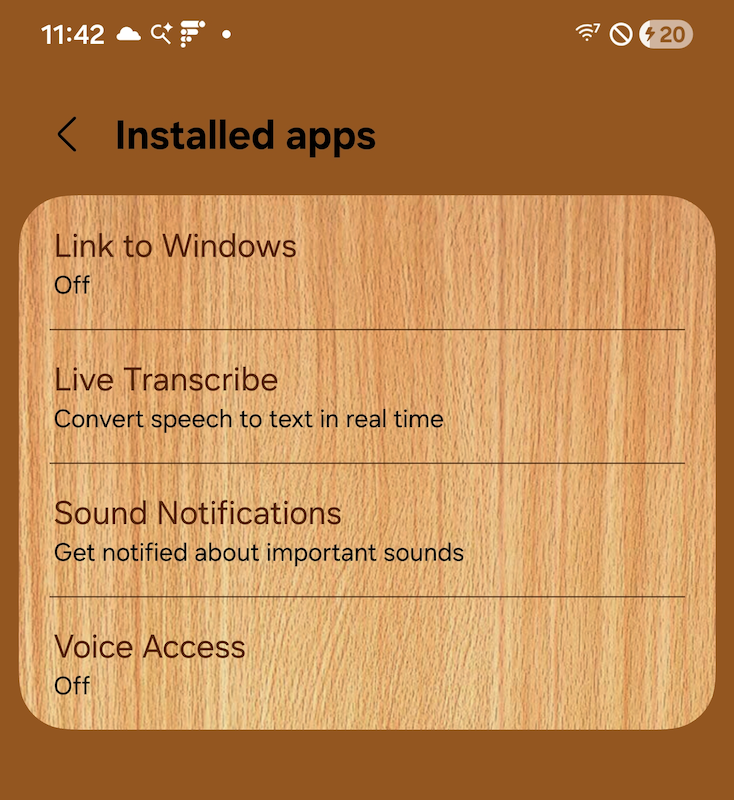
A list of Accessibility Services
This retrieves the list of "Accessibility Services," which are apps that enhance or integrate with Android devices' Accessibility features. The pre-installed services on my Samsung Galaxy S24 are displayed here. These services are particularly useful for fingerprinting, especially when the user has enabled any of them.
isTouchExplorationEnabled() is equivalent to checking whether VoiceOver is enabled.
iOS does not allow public iteration of accessibility tools, but you can use UIAccessibility to check which features are enabled. This helps assess feature usage to make sure a developer can support accessibility features and allows for fingerprinting by creating a hash of the accessibility flags.
-
Finding privacy leaks in iOS hasn’t been very profitable. I started discovering and reporting privacy leaks in iOS back in May 2025. I didn’t receive my first (and only) payment from Apple until December 30, 2025. I used it to cover two months of rent in January. The 13 leaks I’ve reported that haven’t been fixed yet are either unscheduled, scheduled for “Spring 2026”, or scheduled for “Fall 2026.” That means any new leaks or bugs I find that qualify for a bounty won’t be paid until at least October 2026, at the earliest. I just can’t wait that long, although I still keep searching for privacy leaks because privacy is extremely important to me. ⏎
-
I'm currently seeking a contract job or a position involving either iOS or macOS. You can view my résumé and contact information on the About page. My specialty is discovering and fixing obscure bugs. This is what initially led me to work as a reverse engineer, trying to identify and work around bugs in Apple’s operating systems.
Since May 2025, I’ve been developing a semi-automated iOS app that scans device and process memory for privacy leaks. Each time I update it, I make it scan deeper, uncovering more obscure but serious privacy leaks. It has many great features. Recently, I added support for detecting sensitive images. Some information leaks are so severe they could even lead to physical harm for people in certain groups.
So far, I’ve reported 25 privacy leaks to Apple and one kernel panic. As of writing, twelve of these issues and the kernel panic have been fixed. I was trying to secure a contract job or position in Apple’s Privacy Group late last year, but unfortunately, nothing came of it. Even though I know I could do and find much more with the support of an entity as large as Apple.⏎